Web Transfer Client User Interface
The Web Transfer Client User Interface (WTC UI) is a user-friendly graphical interface accessed through a web browser. While WTC configurations are handled by administrators in UDMG, all non-administrative functionality of WTC (managing and transferring files) is handled through the UI.
This document describes the main components of the UI and links to more pages with further details.
Features
The WTC UI has three main pages. See the following documents for more details on each:
- The File Workspace is the WTC home page. From here you can navigate your file system and perform actions on files, such as Download and Share.
- The Shared Files Page is where you can view and manage files you have shared.
- The Profile Settings Page allows you to view and customize WTC settings, such as your password and language settings.
Toasts and Banners
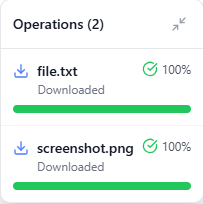
Some actions result in feedback (such as confirmation and error messages) given in the form of toast notifications and banners in the bottom-right corner of the page.
For example, the status of uploads and downloads:
Customizing the WTC User Interface
Administrators can customize various UI elements in WTC, including:
- System Identifier Label
- System Version Label
- System Disclaimer Label
- Custom Logo
These customizations must be made in UDMG on the Local HTTPS Server (WTC) Endpoint. See Local HTTPS Server (WTC) Endpoint - UI Customization for details.