Authentication
UDMG Secure Proxy (USP) implements a multi-layered authentication framework that protects every interaction across its architecture. This framework operates at three levels:
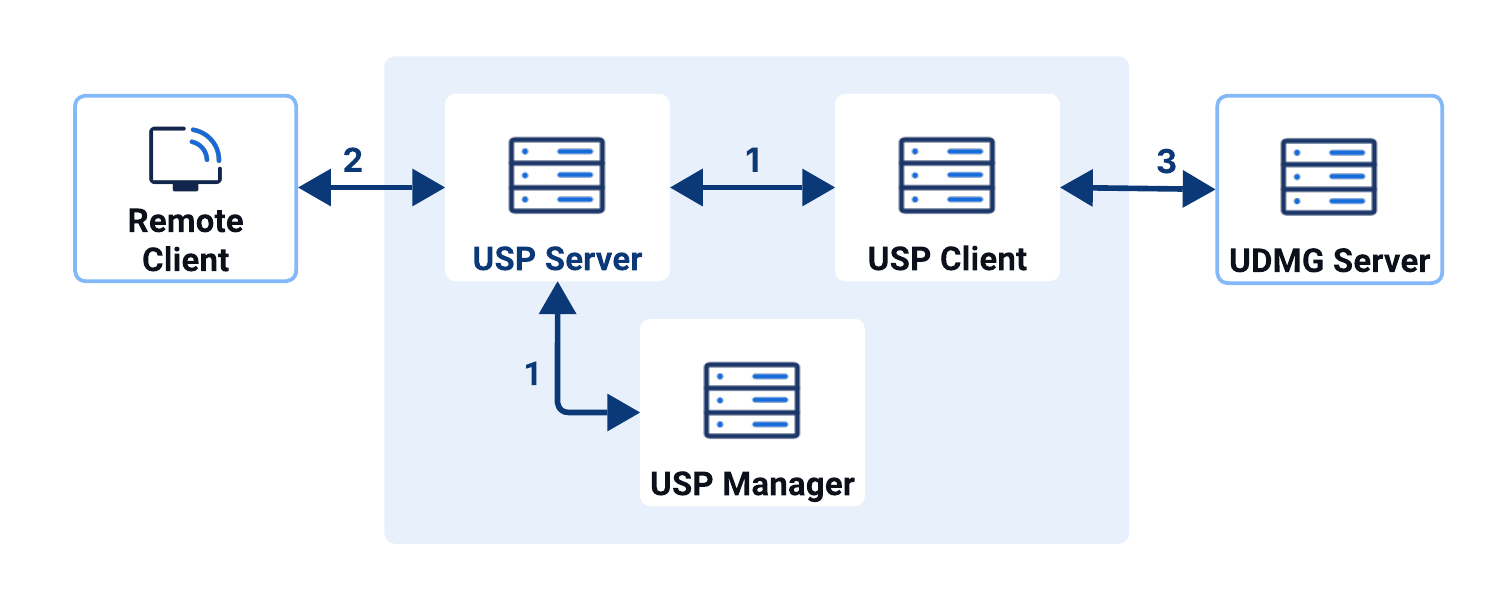
- Component-to-component authentication: How USP Manager, USP Server, and USP Client authenticate each other to establish secure control and data channels.
- Inbound authentication: How the USP Server authenticates itself to and authenticates external clients connecting to it.
- Outbound authentication: How the USP Server authenticates itself to and authenticates internal targets it connects to.
Types of Credentials
To implement authentication across its architecture, USP relies on the following types of credentials:
- Keys:
- Private Keys
- Public Keys
- Certificates:
- TLS Certificates
- CA Certificates
Component-to-Component Authentication
USP Manager, USP Server, and USP Client authenticate with each other using their own dedicated credentials, independent of any application protocol that USP proxies.
The diagram below illustrates all authentication between components and the credentials used for each connection.
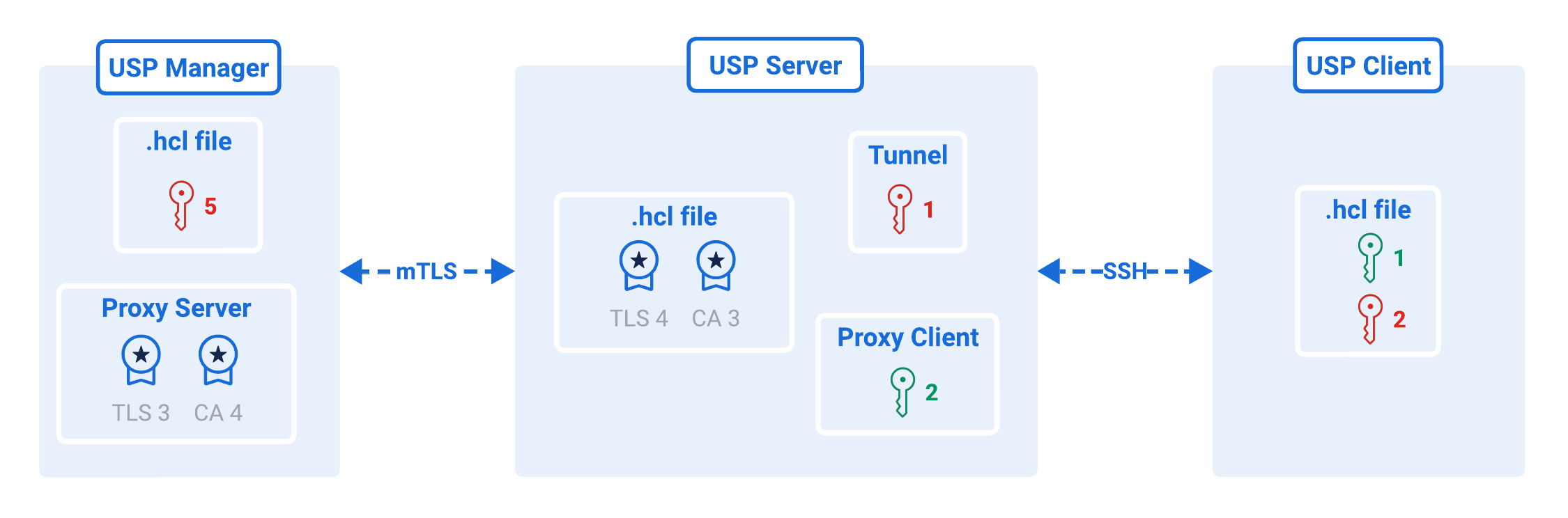
- Key Pair #1
- Key Pair #2
- Certificate Pair #3
- Certificate Pair #4
- Private Key #5
Type: SSH key pair
Purpose: Used by the USP Server to authenticate itself to the USP Client before creating a secure tunnel.
Setup:
- Private Key is set in the Tunnel.
- Matching Public Key is set in the USP Client Configuration File.
Documentation: Authentication Between USP Client and USP Server
Type: SSH key pair
Purpose: Used by the USP Client to authenticate itself to the USP Server before creating the secure tunnel.
Setup:
- Private Key is set in the USP Client Configuration File.
- Matching Public Key is set in the Proxy Client that corresponds to the USP Client.
Documentation: Authentication Between USP Client and USP Server
Type: TLS and CA Certificates
Purpose: Used by the USP Manager to authenticate itself during mTLS with the USP Server.
Setup:
- TLS Certificate is set in the Proxy Server that corresponds to the USP Server instance.
- Matching CA Certificate is set in the USP Server Configuration File.
Documentation: USP Manager and USP Server mTLS Authentication
Type: CA and TLS Certificates
Purpose: Used by the USP Server to authenticate itself during mTLS with the USP Manager.
Setup:
- TLS Certificate is set in the USP Server Configuration File.
- Matching CA Certificate is set in the Proxy Server that corresponds to the USP Server instance.
Documentation: USP Manager and USP Server mTLS Authentication
Type: RSA Private Key
Purpose: Used by the USP Manager to sign JWT tokens for authenticating Admin Users accessing the USP Admin UI or USP REST API.
Setup:
- Private Key is set in the USP Manager Configuration File.
Documentation: USP Manager Installation
Inbound and Outbound Authentication
FTP(S) and HTTP(S)
Both FTP(S) and HTTP(S) protocols can optionally use TLS (Transport Layer Security) to encrypt communication and verify endpoint identities.
The diagram below summarize how USP authenticates both inbound and outbound connections for TLS-based protocols.
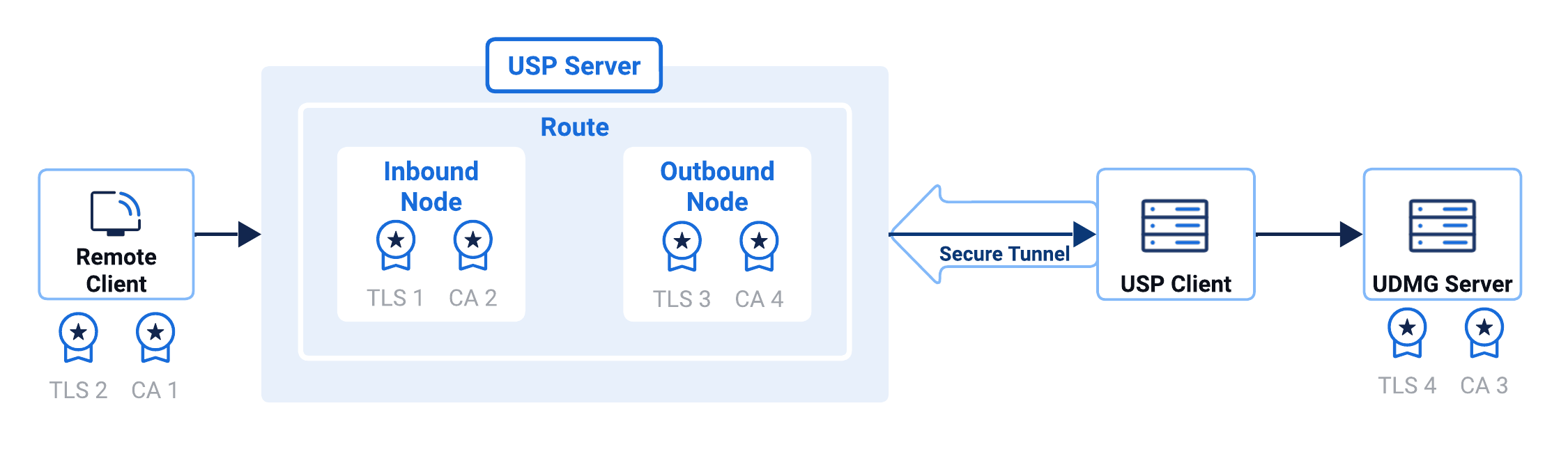
- Certificate Pair #1
- Certificate Pair #2
- Certificate Pair #3
- Certificate Pair #4
Type: TLS and CA Certificates
Purpose: Used by the USP Server to authenticate itself to the external incoming client during the TLS handshake.
Setup:
- TLS Certificate is set in the Inbound Node.
- The external client validates this certificate against its trusted CA.
Documentation: Inbound FTPS/HTTPS Server Identity Verification
Type: TLS and CA Certificates
Purpose: Used by the external incoming client to authenticate to USP Server.
Setup:
- TLS Certificate is provided by the external client.
- Matching CA Certificate is set in the Inbound Node.
Documentation: Inbound FTPS/HTTPS Server Identity Verification
Type: TLS and CA Certificates
Purpose: Used by USP Server to authenticate itself to the internal target during the TLS handshake.
Setup:
- TLS Certificate is set in the Outbound Node.
- The internal target validates this certificate to ensure USP Server identity.
Documentation: Outbound FTPS/HTTPS Target Verification
Type: TLS and CA Certificates
Purpose: Used by USP Server to verify the identity of the internal target.
Setup:
- Obtain the Host Certificate (public certificate) from the internal target.
- Matching CA Certificate is set in the Outbound Node.
Documentation: Outbound FTPS/HTTPS Target Verification
SFTP
SFTP (SSH File Transfer Protocol) uses SSH (Secure Shell) as its underlying transport layer to secure both authentication and data exchange.
The following diagram summarize SSH-based authentication flows for inbound and outbound SFTP connections.
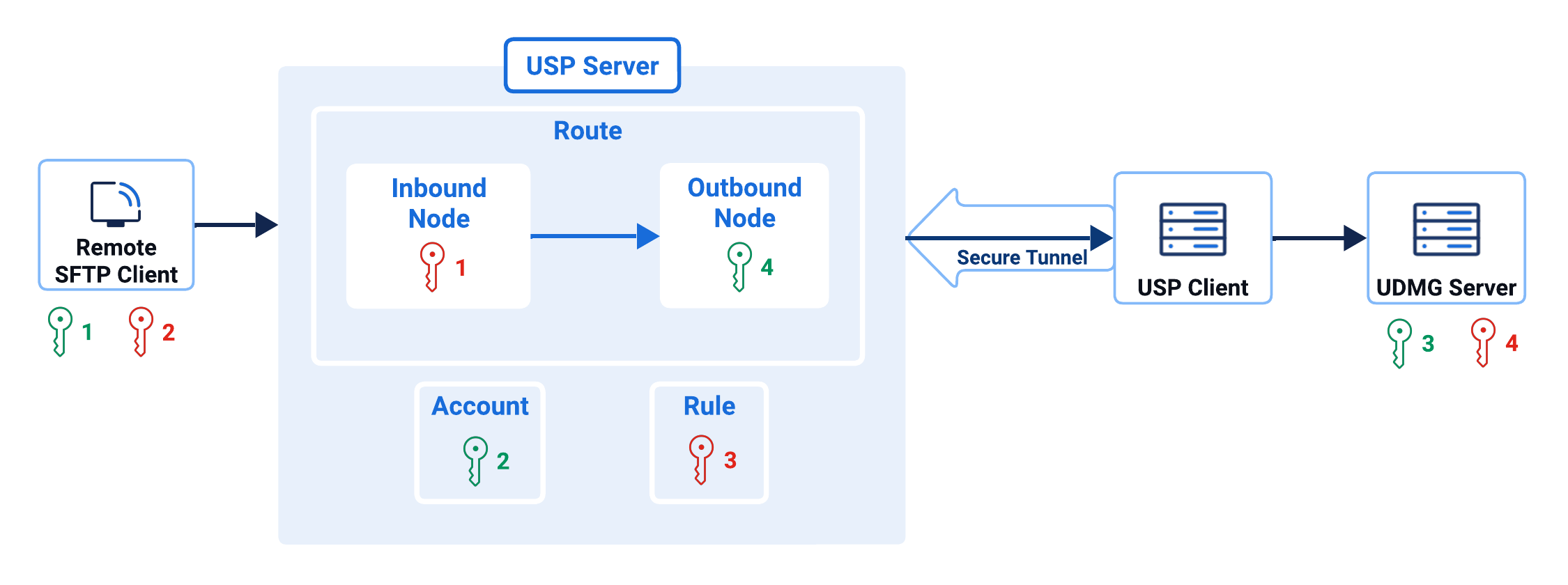
- Key Pair #1
- Key Pair #2
- Key Pair #3
- Key Pair #4
Type: SSH key pair
Purpose: Used by USP Server to authenticate to the external incoming connection.
Setup:
- Private Key is set in the Inbound Node.
- Matching Public Key is set in the external incoming connection, not within USP.
Documentation: USP Server Host Key Verification
Type: SSH key pair
Purpose: Used by the external incoming connection to authenticate itself to USP Server.
Setup:
- Private Key is in the external incoming connection, not within USP.
- Matching Public Key is set in the Account.
Documentation: Account-Based Authentication
Type: SSH key pair
Purpose: Used by USP Server to authenticate itself to the internal target.
Setup:
- Private Key is set in the Rule.
- Matching Public Key is set in the internal target, not within USP.
Documentation: Private Key for Outbound Connection
Type: SSH key pair
Purpose: Used by the USP Server to authenticate the internal target.
Setup:
- Private Key is set in the internal target, not within USP.
- Matching Public Key is set in the Outbound Node.
Documentation: Remote Host Key Verification in Outbound Nodes