Encryption Key Rotation
UDMG Server encrypts sensitive data at rest (for example, stored credentials) and provides key-rotation capabilities to reduce exposure risk and comply with internal security policies.
This document describes the key types, recommended rotation scenarios, and the commands and procedures to perform K0 and K1 rotations safely.
How Encryption Keys Work
UDMG Server uses a multi-tier encryption system with three different key types:
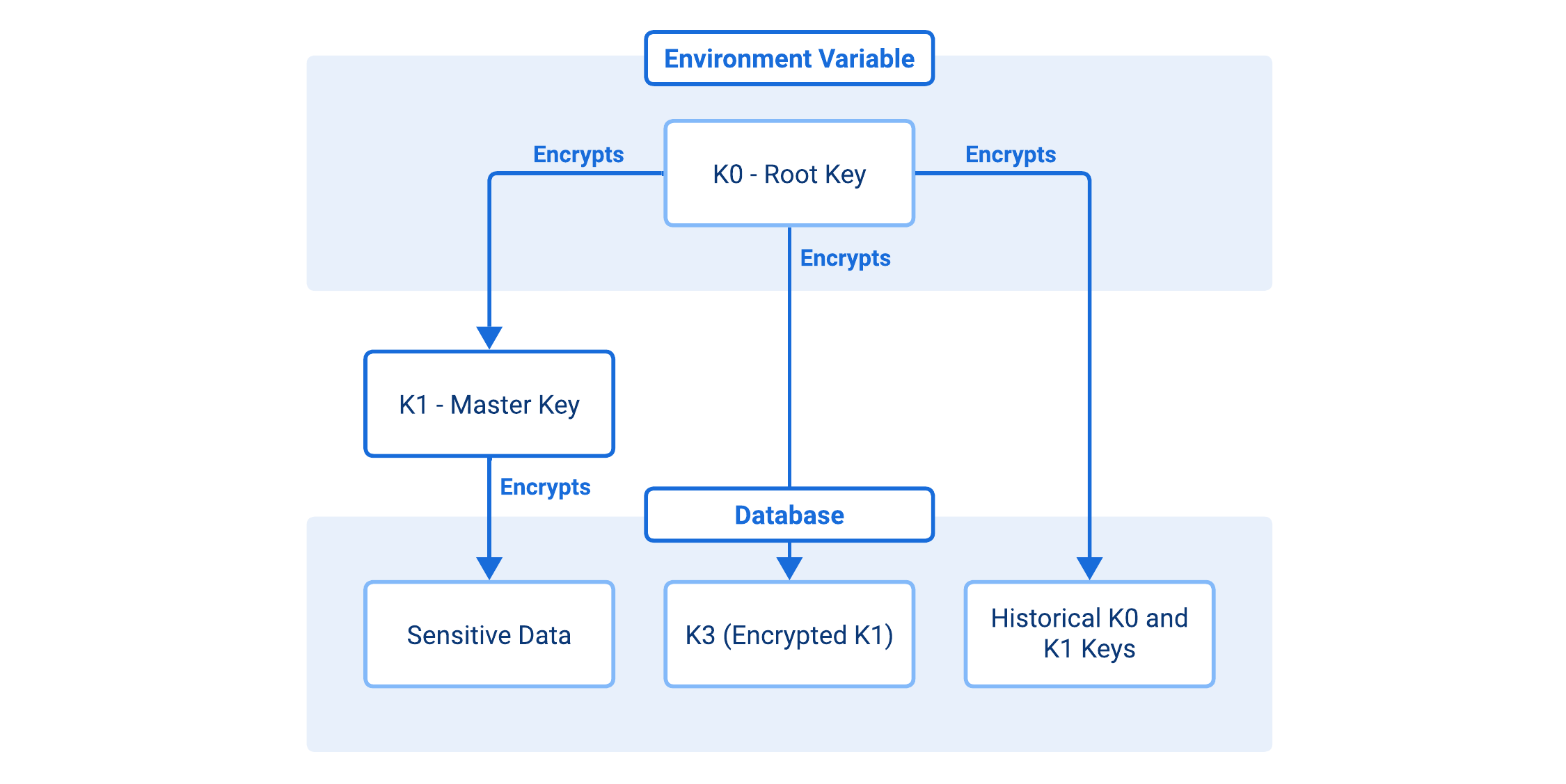
- K0 (Root Key)
- K1 (Master Key)
- K3 (Encrypted K1)
- Used to encrypt/decrypt the K1 (Master Key).
- The root encryption key that must be provided via the
UDMG_SECURITY_PASSPHRASE_KEYenvironment variable. - Represented as a 32-byte (64 hex character) string.
- Supports versioning for safe rotation.
- Historical K0 keys are stored encrypted in the database for continuity of operations.
If you lose the K0 value and do not have a usable passphrase backup, encrypted data will become unrecoverable.
- Used to encrypt all sensitive data.
- Generated automatically during system initialization.
- Never stored in plaintext.
- Supports versioning for smooth rotation.
- The encrypted form of K1, secured by K0.
- Stored in the database.
Encryption Flow
- Data Protection:
- Sensitive data is encrypted using K1 with
AES-256-GCM - The resulting ciphertext is Base64-encoded and stored
- Sensitive data is encrypted using K1 with
- Key Protection:
- K1 is encrypted with K0 using
Fernet(AES-CBC+HMAC-SHA256) - The resulting K3 is stored in the database
- K1 is encrypted with K0 using
- Access Control:
- K0 is required to decrypt K3 and retrieve K1
- K1 is required to decrypt sensitive data
- Absence of K0 makes all encrypted data inaccessible
Key Rotation
This section provides detailed guidance on key rotation procedures for UDMG Server's encryption system. Key rotation is an essential security practice that helps protect your data by periodically changing the encryption keys.
Why Rotation Exists
- Rotating K0 changes the root key used to protect K1 (and other stored key material), without changing K1 itself.
- Rotating K1 changes the key that encrypts sensitive data, which is the stronger response to suspected data-key compromise.
UDMG Server also supports versioning, so older encrypted values remain readable while the system migrates to the newest key version over time.
Rotation Modes
UDMG Server supports two modes for both K0 and K1 rotation:
- Gradual migration (default): Encrypted values are updated over time as they are accessed.
- Immediate re-encryption (
--reencryptflag): Forces UDMG Server to re-encrypt all encrypted values immediately. This is more disruptive and should typically be used only in emergencies or during a maintenance window.
Before You Rotate
- Plan a maintenance window if you will use
--reencrypt(large databases can see significant load). - Ensure all UDMG Server nodes will receive the same K0 value (for HA deployments).
- Back up the passphrase/key material (see Disaster Recovery).
If you lose the K0 value and do not have a usable passphrase backup, encrypted data will become unrecoverable.
Rotate K0 (Root Key)
Rotate K0 when you need to replace the environment-provided secret (for example, after staff changes or if the value may have leaked).
To rotate K0, follow these steps:
1. Generate a New Key
- Linux
- Windows (PowerShell)
NEW_KEY=$(openssl rand -hex 32)
echo $NEW_KEY
$bytes = New-Object byte[] 32
[System.Security.Cryptography.RandomNumberGenerator]::Create().GetBytes($bytes)
$NEW_KEY = -join ($bytes | ForEach-Object { $_.ToString("x2") })
$NEW_KEY
2. Run the Rotation
Run the following command in your terminal (Linux shell or Windows PowerShell):
- Gradual (recommended)
- Immediate (--reencrypt)
udmg-server rotate-k0 --new-key "$NEW_KEY"
udmg-server rotate-k0 --new-key "$NEW_KEY" --reencrypt
3. Update the Environment Configuration
Update your environment so every UDMG Server instance uses the new key. Depending on the setup, this may require updating the configuration file, the system service files, the application user profile, or any other script for the retrieval and definition of the UDMG_SECURITY_PASSPHRASE_KEY parameter.
After rotation, you must update the environment variable in all relevant configuration files and deployment scripts where the key is stored.
What Changes During K0 Rotation
- K1 is decrypted using the current K0.
- K1 is re-encrypted with the new K0 (K3 is updated).
- Historical K0 material is preserved so older encrypted values remain readable during migration.
- If you use
--reencrypt, UDMG also forces immediate migration of encrypted values (higher impact).
Rotate K1 (Master Key)
Rotate K1 when you want to rotate the key that actually encrypts sensitive data, especially after a suspected compromise or to meet strict rotation policies.
To rotate K1, use one of the following commands (Linux shell or Windows PowerShell):
- Gradual (recommended)
- Immediate (--reencrypt)
udmg-server rotate-master-key
udmg-server rotate-master-key --reencrypt
What Changes During K1 Rotation
- A new random K1 is generated.
- The new K1 is encrypted with K0 and stored as the new K3.
- Previous key versions are preserved so data encrypted with older versions can still be decrypted.
- With gradual rotation, encrypted values are updated as they are accessed.
- With
--reencrypt, UDMG re-encrypts all encrypted data immediately.
After You Rotate
- Verify that logins/authentication flows that use stored credentials continue working.
- Monitor system load (especially after
--reencrypt). - Confirm configuration consistency in clustered deployments; ensure every node is using the correct
UDMG_SECURITY_PASSPHRASE_KEY.
Disaster Recovery
Before rotating K0 or K1, create a passphrase backup and store it in a secure location.
UDMG's key-rotation process is designed to be safe, but you still need a known-good recovery point in case a rotation is interrupted, configuration is applied inconsistently across nodes, or the environment-provided K0 is lost or mistyped.
Recommended Workflow
-
Create a backup before rotation using the following command:
udmg-server passphrase-backup --output <backup-file-path>infoReplace
<backup-file-path>with a secure path on your system, for example:- Linux:
/secure/path/passphrase.backup - Windows:
C:\secure\path\passphrase.backup
- Linux:
-
Perform the rotation (K0 or K1), and apply any required configuration updates (for example, updating
UDMG_SECURITY_PASSPHRASE_KEYeverywhere after a K0 rotation). -
Validate the system (for example, ensure that stored-credential authentication paths still work, and that no decryption errors appear in logs).
-
(Recommended) Take a new backup after a successful rotation and keep it alongside the prior backup, following your retention policy.
Restore from a Backup
If encrypted data becomes unreadable after a rotation, restore the last known-good backup using the following command:
udmg-server passphrase-restore --input <backup-file-path>
Replace <backup-file-path> with the location of your backup file, for example:
- Linux:
/secure/path/passphrase.backup - Windows:
C:\secure\path\passphrase.backup
If you lose the K0 value and do not have a usable passphrase backup, encrypted data will become unrecoverable.
Troubleshooting
Decryption Failures After Rotation
- Confirm
UDMG_SECURITY_PASSPHRASE_KEYis set and identical across all nodes. - If rotation was recent, ensure all nodes were restarted with the new environment value.
- If available, restore the last known-good passphrase backup and retry.
Performance Issues During --reencrypt
- Run rotations during a maintenance window.
- Temporarily scale database resources if needed.
- Prefer gradual mode for routine rotations.
Recommendations
- Rotate K0 after operational events that may expose environment secrets.
- Rotate K1 on a security schedule (for example, quarterly) or after any suspected compromise.
- Prefer gradual rotation for routine maintenance; reserve
--reencryptfor emergencies. - Store
UDMG_SECURITY_PASSPHRASE_KEYin a secrets manager (not in plain text files or shell history).