Webhooks
You can register a third party webhook URL (or Task) to trigger when a specific built-in Universal Event is published.
If you have a custom integration, you can register your webhook to launch an appropriately configured Universal Task.
To allow for the enforcement of read permission for Universal Events, the registration needs to have a security context.
If no Execution User is explicitly assigned, the registration will run under the security context of the user who enabled the registration.
In order for a registration to trigger, the Execution User must have the following authorization.
- Read permission for the published Universal Event and read permission for the underlying record the Universal Event is associated with.
- If a Task is specified instead of a URL, Launch permission for the Task.
- If a Task is specified instead of a URL, any permissions required by the Task Instance, such as Execute permission for Credentials.
If a Task is specified, the built-in variables outlined below can be used to pass data where appropriate:
Changes to webhook records (create, update, delete, and execution user assignment) can be observed via the UAC - Record Changed system Universal Event. Enabling or disabling a webhook does not publish this event.
Creating a Webhook
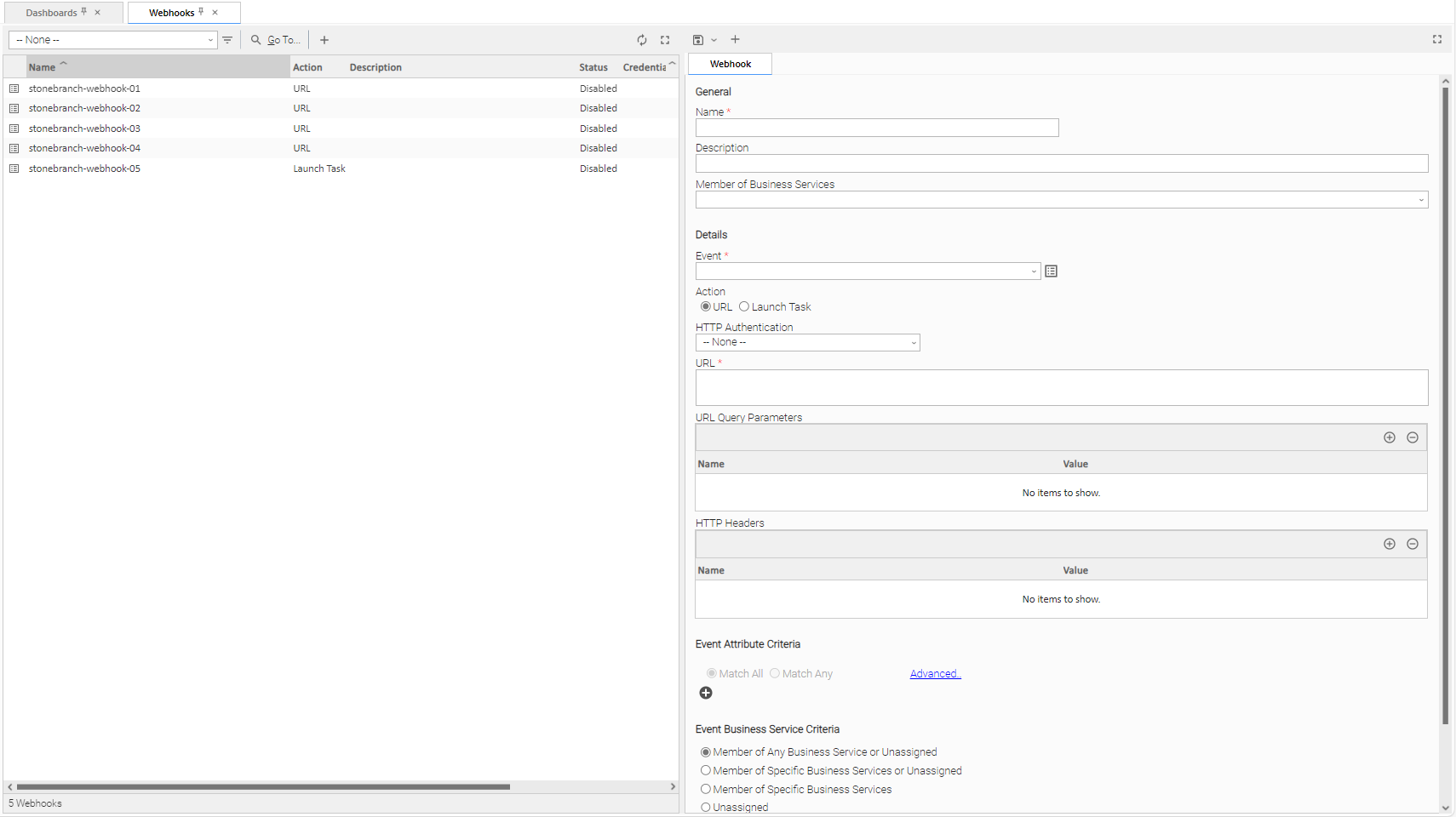
Step 1 | From the Services navigation pane, select Administration > Webhooks. The Webhooks list displays:
|
|---|---|
Step 2 | Enter / select Details for a new Webhook, using the field descriptions below as a guide.
To display more of the Details fields on the screen, you can either:
|
Step 3 | Click a |
 button. The Webhook record is added to the database, and all buttons in the Webhook Details are enabled.
To open an existing record on the list, either:
- Click a record in the list to display its record Details below the list. (To clear record Details below the list, click the
 button that displays above and below the Details.)
 - Clicking the Details icon next to a record name in the list, or right-click a record in the list and then click Open in the Action menu that displays, to display a pop-up version of the record Details.
- Right-click a record in the a list, or open a record and right-click in the record Details, and then click Open In Tab in the Action menu that displays, to display the record Details under a new tab on the record list page (see Record Details as Tabs).
Webhook Details
The following Webhook Details is for a new Webhook. See the field descriptions, below, for a description of all fields that display in the Webhook Details.
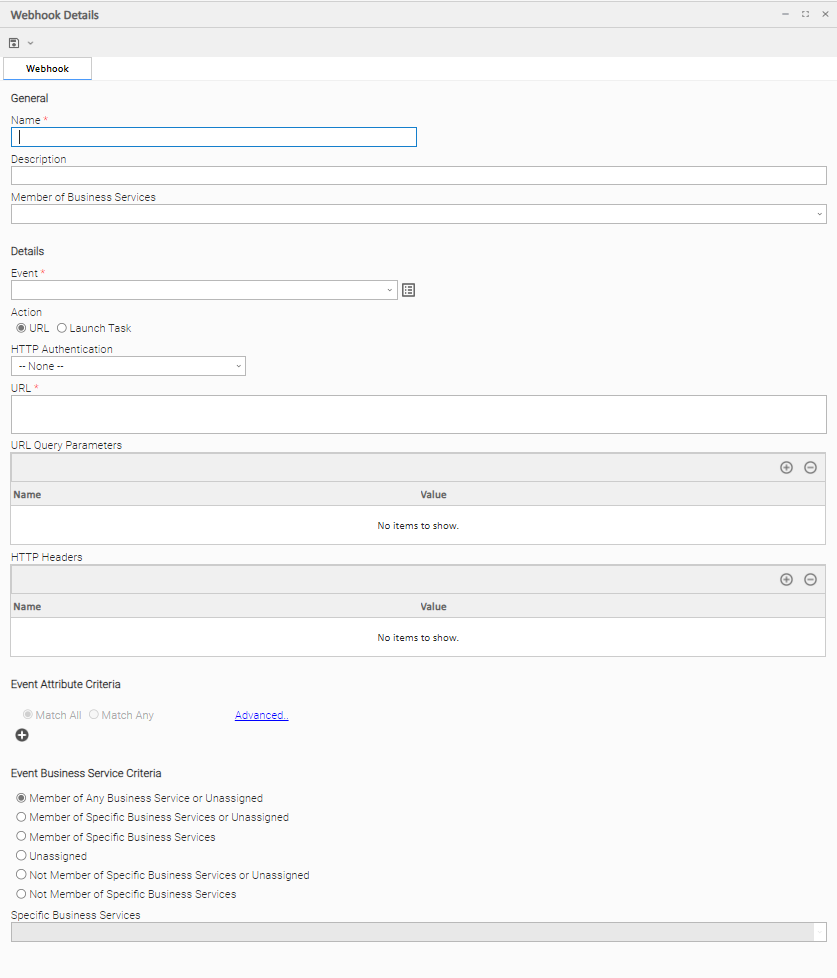
Webhook Details Field Descriptions
The following tables describe the fields, buttons, and tabs that display in the Webhook Details.
General
This section contains general information about the Webhook.
Field Name | Description |
|---|---|
Name | User-defined name of this webhook. |
Description | Description of this record. (Maximum = 255 characters.) |
Member of Business Services | User-defined; Allows you to select one or more Business Services that this record belongs to. (You also can Check All or Uncheck All Business Services for this record.) You can select up to 62 Business Services for any record type, and enter a maximum of 2048 characters for each Business Service. If the Business Service Visibility Restricted Universal Controller system property is set to true, depending on your assigned (or inherited) Permissions or Roles, Business Services available for selection may be restricted. |
Details
This section contains detailed information about the Webhook.
Field Name | Description |
|---|---|
Event | Specifies the Universal Event Template to be monitored. Only System Templates are allowed. |
Action | Type of Action (URL or Launch Task) to be taken when the event changes are published. |
HTTP Authentication | If Action is URL; Specifies the HTTP authentication scheme to use. |
Credentials | If HTTP Authentication is Basic; Credentials for the URL. Click the details icon to create a new credentials record or view a selected credential's definition. |
URL | If Action is URL; Specifies the URL. |
URL Query Parameters | If Action is URL; Specifies any query parameters to be encoded as a query string and appended to the URL. |
HTTP Headers | If Action is URL; Specifies the HTTP headers. |
Task | If Action is Launch Task; Select the task to execute. Click the details icon to view the task definition. |
Event Attribute Criteria
This section contains criteria for selecting Universal Events to monitor.
Field Name | Description |
|---|---|
| Specification of a filter for the specific type of Universal Event.
|
Event Business Service Criteria
This section contains criteria for selecting Universal Events to monitor by their business service membership.
Field Name | Description |
|---|---|
| Criteria for matching on Universal Events by their business service membership.
|
Metadata
This section contains Metadata information about this record.
Field Name | Description |
|---|---|
UUID | Universally Unique Identifier of this record. |
Updated By | Name of the user that last updated this record. |
Updated | Date and time that this record was last updated. |
Created By | Name of the user that created this record. |
Buttons
This section identifies the buttons displayed above and below the Webhook Details that let you perform various actions.
Field Name | Description |
|---|---|
Save | Saves a new Webhook record in the Controller database. |
Save & New | Saves a new record in the Controller database and redisplays empty Details so that you can create another new record. |
New | Displays empty (except for default values) Details for creating a new record. |
Update | Saves updates to the record. |
Delete | Deletes the current record. |
Enable | Enables the current Webhook. |
Disable | Disables the current Webhook. |
Refresh | Refreshes any dynamic data displayed in the Details. |
Close | For pop-up view only; closes the pop-up view of this task. |
URL Action
The URL action facilitates the passing of matched Universal Event details as JSON in the body of the POST request.
URL Action JSON Properties
Property | Description | Data Type |
|---|---|---|
| Attributes of the Universal Event. The attributes object contains name/value pairs for each Attribute of the Universal Event. | object The Attribute value will be mapped to a data type using the Attribute type.
|
| Business Services of the Universal Event. If the Universal Event is published from a universal task instance (via the Universal Extension API), the Universal Event inherits the business services from the task instance. If the Universal Event is a system-published event, it inherits the business services of the object the event is being published for. If the Universal Event is published via our publish web service API, the business services are specified as part of the request body. If the Universal Event is published via our push web service API, the business services are specified as part of the request query parameters. | JSON array literal with string array values |
| Name of the Universal Event. | string |
| UUID of the Universal Event Template for the Universal Event. | string |
| Name of the Webhook that handled the matched Universal Event. | string |
URL Action JSON Examples
{
  "attributes" : {
    "after_value_boolean" : true,
    "name" : "Custom Day Local Indicator Enabled",
    "updated_by" : "ops.admin",
    "before_value_boolean" : false,
    "after_value" : "true",
    "updated" : "2023-04-03 13:03:13 -0400",
    "before_value" : "false",
    "property_name" : "uc.custom_day.local_indicator.enabled"
  },
  "businessServices" : [],
  "name" : "uac_property_changed",
  "templateId" : "4dde3b099053409e81fcae415cb91c02",
  "webhookName" : "stonebranch-webhook-01"
}
{
  "attributes" : {
    "hb_grace_period" : 60,
    "agent_id" : "AGNT0001",
    "log_level" : "Info",
    "ip_address" : "127.0.1.1",
    "version" : "7.4.0.0",
    "suspended" : false,
    "agent_type" : "Linux/Unix",
    "decommissioned" : false,
    "event_type" : "Updated",
    "hb_intvl" : 120,
    "build" : "51",
    "transient" : false,
    "name" : "stonebranch-agent-01 - AGNT0001",
    "updated_by" : "ops.admin",
    "updated" : "2023-04-03 13:32:57 -0400",
    "host_name" : "stonebranch-agent-01",
    "status" : "Active",
    "agent_type_value" : 2
  },
  "businessServices" : [],
  "name" : "uac_agent_changed",
  "templateId" : "850d38176e944ca3ae49a3cb52f98cdb",
  "webhookName" : "stonebranch-webhook-05"
}
{
  "attributes" : {
    "attempt" : 1,
    "calendar_id" : "77171434c0a801c9016d5b2b5d17ddee",
    "created" : "2024-03-11 15:01:39 -0400",
    "current_retry_count" : 0,
    "early_finished" : false,
    "execution_user" : "Admin",
    "exit_code" : "0",
    "instance_id" : "1710013567491690711LXITAWF41VSXZ",
    "instance_name" : "stonebranch-timertask-01",
    "instance_number" : 2,
    "invoked_by" : "Manually Launched",
    "late_finished" : true,
    "late_started" : true,
    "launch_source" : "Launch Task / User Interface",
    "launch_time" : "2024-03-11 15:01:39 -0400",
    "maximum_retries" : 0,
    "retry_indefinitely" : false,
    "security_name" : "stonebranch-timertask-01",
    "simulate" : false,
    "sla_type" : "Finished Late",
    "source_version" : 17,
    "start_time" : "2024-03-11 15:01:39 -0400",
    "state_changed_time" : "2024-03-11 15:01:39 -0400",
    "status" : "Running",
    "status_value" : 80,
    "task_id" : "f0f47f5fdc264c3f8d78e76e794863ca",
    "type" : "Timer",
    "type_value" : 2,
    "updated" : "2024-03-11 15:01:39 -0400"
  },
  "businessServices" : [ ],
  "name" : "uac_task_sla",
  "templateId" : "69372756e6ec401d8162621f61c611eb",
  "webhookName" : "stonebranch-webhook-05"
}
Event: UAC - Task Status Changed
{
  "attributes" : {
    "attempt" : 1,
    "calendar_id" : "77171434c0a801c9016d5b2b5d17ddee",
    "created" : "2023-09-27 11:45:32 -0400",
    "current_retry_count" : 0,
    "early_finished" : false,
    "end_time" : "2023-09-27 11:45:39 -0400",
    "execution_user" : "Admin",
    "exit_code" : "0",
    "halt" : false,
    "instance_id" : "1695826587880446240E92L94VWWP1NY",
    "instance_name" : "stonebranch-linuxunixtask-01",
    "instance_number" : 1,
    "invoked_by" : "Manually Launched",
    "late_finished" : false,
    "late_started" : false,
    "launch_source" : "Launch Task / User Interface",
    "launch_time" : "2023-09-27 11:45:32 -0400",
    "maximum_retries" : 0,
    "retry_indefinitely" : true,
    "security_name" : "stonebranch-linuxunixtask-01",
    "simulate" : false,
    "source_version" : 32,
    "state_changed_time" : "2023-09-27 11:45:39 -0400",
    "status" : "Finished",
    "status_description" : "Agent is not Active -> State was forced from UNDELIVERABLE to FINISHED",
    "status_value" : 190,
    "task_id" : "6a8cfdcc05ad49d1b2e9153e831a3334",
    "type" : "Linux/Unix",
    "type_value" : 4,
    "updated" : "2023-09-27 11:45:33 -0400"
  },
  "businessServices" : [
     "stonebranchbusinessservice 01",
     "stonebranchbusinessservice 02"
  ],
  "name" : "uac_task_status_changed",
  "templateId" : "7fda9c3f452e4fe78a4f9dc3afad8353",
  "webhookName" : "stonebranch-webhook-05"
}
{
  "attributes" : {
    "audit_record_id" : "1787166879396076352KYCNCIVWAY2BR",
    "changed" : "2026-08-19 15:20:29 -0400",
    "changed_by" : "ops.admin",
    "operation" : "Update",
    "record_id" : "e4f44310055646beb76d4149259bba32",
    "record_name" : "Rc - Test #2",
    "record_sub_type" : "Workflow",
    "record_table" : "ops_task_workflow",
    "record_type" : "Task",
    "source" : "User Interface",
    "template_id" : "",
    "template_name" : ""
  },
  "businessServices" : [ "DEV", "QA" ],
  "name" : "uac_record_changed",
  "templateId" : "b6fafca8f4c842229e71e2ae96d20f72",
  "webhookName" : "RCE Web Hook"
}