Creating Promotion Targets
Creating a Promotion Target
Before you can promote a Bundle (or individual record) to Universal Controller, you must create a Promotion Target record for a cluster node of that Controller. A Promotion Target record contains the Uniform Resource Identifier (URI) of a target cluster node and, optionally, the user name and password required to log on to the cluster node.
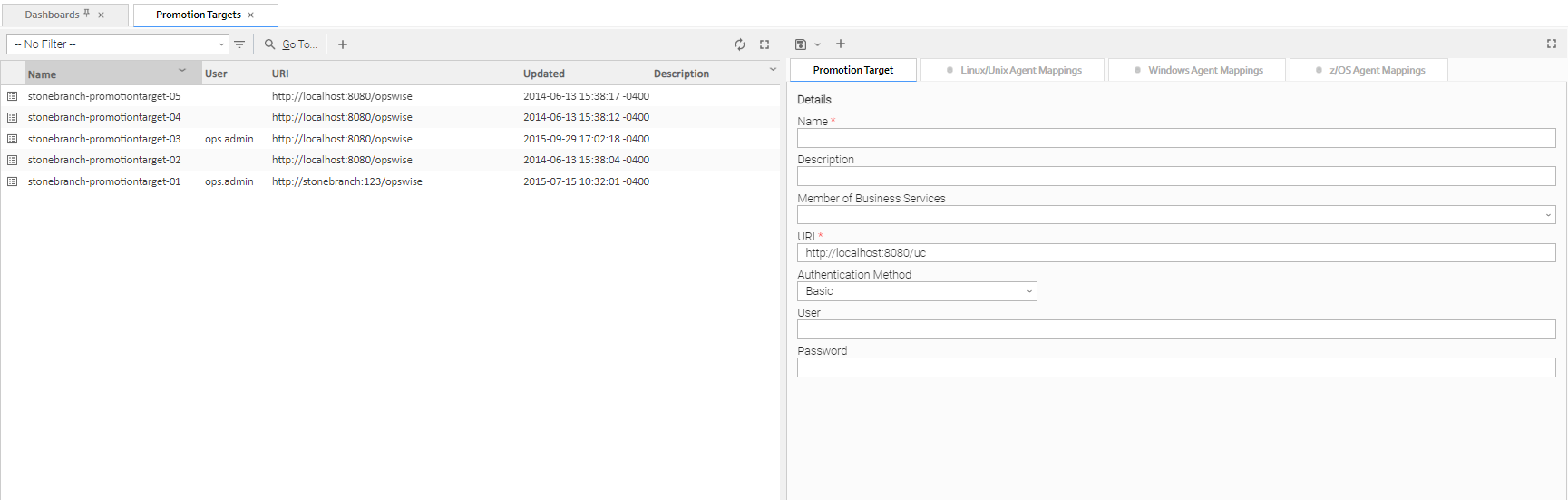
Step 1 | From the Bundles & Promotion navigation pane, select Promotion Targets. The Promotion Targets list displays a list of existing Promotion Targets. To the right of the list, Promotion Target Details for a new Promotion Target record displays.
|
|---|---|
Step 2 | Enter / select Details for a new Promotion Target, using the field descriptions below as a guide.
To display more of the Details fields on the screen, you can either:
|
Step 3 | Click a |
 button above the list to display a pop-up version of the Details.
 button. The Promotion Target record is added to the database, and all buttons and tabs in the Promotion Target Details are enabled.
To open an existing record on the list, either:
- Click a record in the list to display its record Details below the list. (To clear record Details below the list, click the New button that displays above and below the Details.)
- Clicking the Details icon next to a record name in the list, or right-click a record in the list and then click Open in the Action menu that displays, to display a pop-up version of the record Details.
- Right-click a record in the a list, or open a record and right-click in the record Details, and then click Open In Tab in the Action menu that displays, to display the record Details under a new tab on the record list page (see Record Details as Tabs).
Promotion Target Details
The following Promotion Target Details is for an existing Promotion Target. See the field descriptions, below, for a description of all fields that display in the Promotion Target Details.
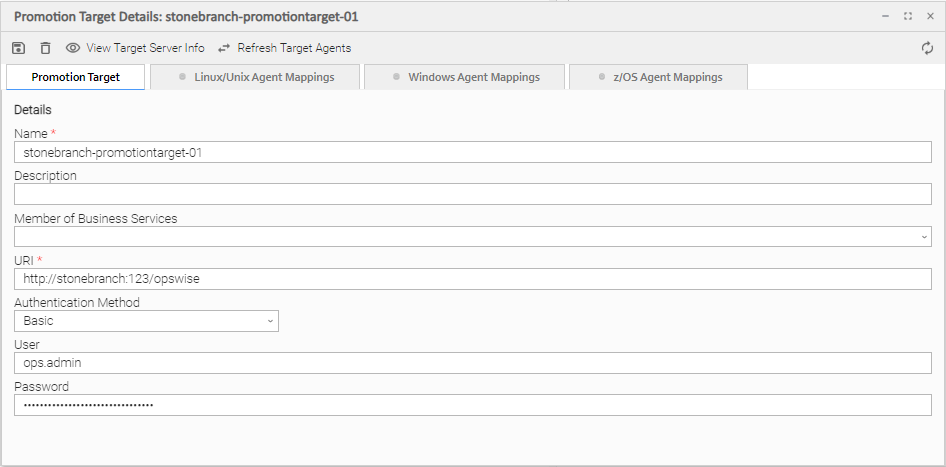
For information on how to access additional details - such as Metadata and complete database Details - for Promotion Targets (or any type of record), see Records.
Promotion Target Details Field Descriptions
The following tables describe the fields, buttons, and tabs that display in the Promotion Target Details.
Details
This section contains detailed information about the Promotion Target.
Field Name | Description |
|---|---|
Name | Name for this Promotion Target. |
Description | Description of this record. Maximum length is 255 characters. |
Member of Business Services | User-defined; Allows you to select one or more Business Services that this record belongs to. (You also can Check All or Uncheck All Business Services for this record.) You can select up to 62 Business Services for any record type, and enter a maximum of 2048 characters for each Business Service. If the Business Service Visibility Restricted Universal Controller system property is set to true, depending on your assigned (or inherited) Permissions or Roles, Business Services available for selection may be restricted. |
URI | Uniform Resource Identifier (URI) used to locate the Promotion Target cluster node. info By default, the URI of the cluster node that you are logged into displays. You must change this to the URI of a target cluster node, using the default URI format. |
User | Login ID on the target cluster node of Universal Controller. |
Password | Login password on the target cluster node of Universal Controller. |
Metadata
This section contains Metadata information about this record.
Field Name | Description |
|---|---|
UUID | Universally Unique Identifier of this record. |
Updated By | Name of the user that last updated this record. |
Updated | Date and time that this record was last updated. |
Created By | Name of the user that created this record. |
Created | Date and time that this record was created. |
Buttons
This section identifies the buttons displayed above and below the Promotion Target Details that let you perform various actions.
Field Name | Description |
|---|---|
Save | Saves a new record in the Controller database. |
Save & New | Saves a new record in the Controller database and redisplays empty Details so that you can create another new record. |
Save & View | Saves a new record in the Controller database and continues to display that record. |
New | Displays empty (except for default values) Details for creating a new record. |
Update | Saves updates to the record. |
Server Info | Displays a Remote Server Information pop-up that contains details about the cluster node identified in this record. |
Refresh Target Agents | Accesses the specified Universal Controller server and fetches all Agent records. For details, see Specifying Agent Mapping. |
Delete | Deletes the current record. |
Refresh | Refreshes any dynamic data displayed in the Details. |
Close | For pop-up view only; closes the pop-up view of this record. |
Tabs
This section identifies the tabs across the top of the Promotion Target Details that provide access to additional information about the Bundle.
Field Name | Description |
|---|---|
<Agent-type> Mappings | Lists all Agent mapping instructions between the source and target Controllers. See Specifying Agent Mapping. |