Action Menus
Action menus contain a set of actions and commands that you can apply to a list of records or one or more individual records. The actions listed on an Action menu are context-sensitive; they appear only as appropriate for the type of list or record (and as allowed by your User Permissions).
Accessing Action Menus
To access an Action menu:
For a List | Right-click a column header to display an Action menu containing a set of actions that you can apply to that column or to the entire list. |
|---|---|
For a Record | Either:
info The list of actions on an Action menu for a record may differ depending on whether you accessed the menu from the records list or from the record Details. |
The following is a sample Action menu for an individual record selected on a list:
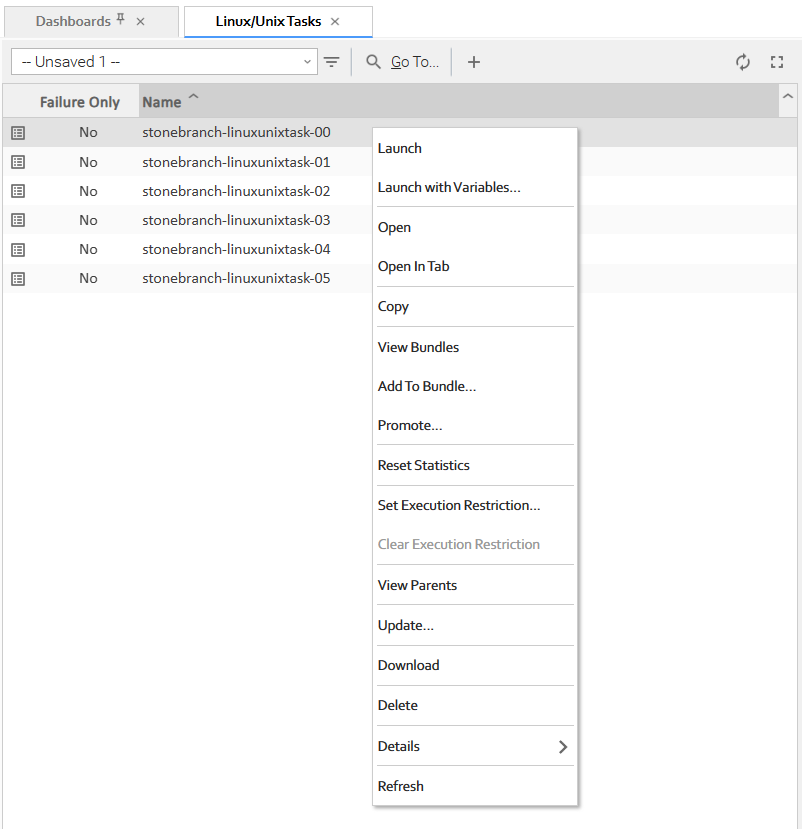
Actions
The following table identifies actions that can appear on Action menus throughout the Universal Controller user interface. The Availability column identifies the location(s) from where each action is available.
Most actions are available for multiple, if not all, record types. Some actions are available for specific record types; these actions are categorized alphabetically following the list of actions for multiple record types:
- Multiple Record Types
- Agents and Agent Clusters
- Applications
- Approval Task Instances
- Bundles and Promotion
- Calendars and Custom Days
- Dashboards
- Data Backup/Purge
- Data Encryption Key Settings
- Manual Task Instances
- Reports
- SAP Task Instances
- Task Instances
- Task Monitor Task Instances
- Tasks
- Triggers
- Universal Templates
- Users and Groups
- Virtual Resources
- Workflow Task Instances
- Workflow Tasks
- z/OS Task Instances
- z/OS Tasks
Action | Availability | Description |
|---|---|---|
Multiple Record Types | ||
Add To Bundle... | For any type of record that can be added to a Bundle:
| Adds this record to any existing Bundle. This action is enabled only if a user has the ops_bundle_admin role or at least one Bundle Update permission assignment.
Only users with the ops_bundle_admin role or Update permission for the bundle can add definitions to the Bundle. |
Auto Fit |
| Left-adjusts all columns in the list to their smallest size that still displays the full column name and column details for all records in the list. |
Auto Fit All Columns |
| Adjusts all Auto Fitted columns back to their original size. |
Clear Sort |
| Clears the temporary sort levels that you created via the Configure Sort action. |
Close |
| Closes the Details pop-up of any record. |
Columns... |
| Displays a list of all available columns that can be displayed for this list. Click any column in the list to display / remove it. |
Compare Versions |
| Compares the details of two versions of a record (see Comparing Record Versions). |
Compare with Current Version |
| Compares the details of the selected version with the current version of the record (see Comparing Record Versions). |
Configure Sort |
| Sorts a list according to temporary, user-defined sort levels for a column on the list (see Configure a Multi-Level Sort). |
Copy |
| Creates a copy of the selected record, which you are prompted to rename. |
CSV |
| Exports records on a list in CSV (comma-separated values in an Excel file) format (see Exporting Records to an Output File). |
Details > |
| Displays a menu of the following actions:
|
Delete |
| Deletes the selected record(s). |
Download |
| Downloads the selected record(s) to a zip file on your local file system. |
Download Filtered |
| Downloads all records in the list that match the current filter to a zip file on your local file system.
|
Export > |
| Exports records on a list in either of seven formats (as available for the type of record in the list): |
Hide Metadata |
| Hide Metadata for these Details. |
Import |
| Imports valid XML files (usually from an Export) from a user-defined location to a list. Import performs a pre-validation on the XML files; if any files are found to be invalid, a warning displays on the Console and the import operation is aborted. Any invalid XML files should be fixed or removed from that location. |
Insert |
| Creates a copy of the current record, for which which you have just entered a new Name. |
Layouts > |
| Displays a menu of available layouts for this list. |
New |
| Displays empty Details for you to begin creating a new record. |
Open |
| Opens the Details pop-up of a record. |
Open |
| Opens a page right-clicked in the Navigator under the current tab. (If the current tab is for the Activity Monitor or Dashboard Details, the page will open in a new tab (see Tabs). |
Open In New Tab |
| Opens a page right-clicked in the Navigator under a new tab. |
Open In Tab |
| Displays the record Details under a new tab rather than as a pop-up (see Opening a Record). |
| Exports the displayed data (the selected columns) of every record on a list into PDF format (see Exporting Records to an Output File). | |
| Prints the record Details as shown in the user interface. | |
Promote... | For any type of record that can be promoted:
| Copies this record from this source cluster node to a target cluster node. The Promote... action is disabled unless a user has the ops_promotion_admin role or if the Bundleless Promotion With Execute Permission Permitted Universal Controller system property is true and the user has at least one promotion target Execute permission assignment.
The server will prohibit the user from promoting the definition using the promotion target if neither of the two conditions are met:
|
Refresh |
| Refreshes all dynamic information in the Details. |
Restore Default Layout |
| Restores the current layout of the list to its default layout. |
Restore Version |
| Restores an old version of a record. |
Save |
| Saves this record and, if the record is displayed in a pop-up dialog, closes the record. (Same action as Save button on Details.) |
Save & New |
| Saves this record and displays empty Details for a new record. (Same action as Save & New button on Details.) |
Save As Default Layout |
| Saves the current layout of the list as the default layout. |
Save Layout... |
| Saves the current layout of the list. |
Show Details |
| Displays all details stored in the database for this record in table format. |
Show Metadata |
| Display Metadata for these Details. |
Sort Ascending |
| Sorts the list in ascending alphabetical order. |
Sort Descending |
| Sorts the list in descending alphabetical order. |
System Default |
| Selects the default layout for the list. |
Test Connection |
| Performs a connectivity test to the selected connection. (Same action as Test Connection button on Details.) |
Update |
| Updates the Details of any record and, if the Details are displayed in a pop-up dialog, closes the pop-up. (Same action as Update button on Details.) |
Update & View |
| Updates the Details of any record and continues to display the record. |
Update... |
| Updates all currently selected records in the list. |
Update Filtered... |
| Updates all records in the list that match the current filter. |
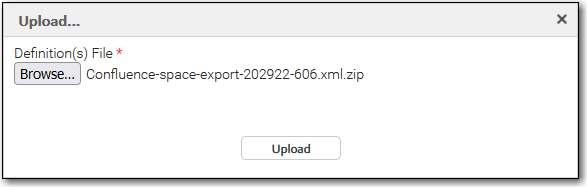
Upload... |
| Uploads all selected files.
Click Browse to select the file(s) that you want to upload.
Click Upload to upload the selected file(s). |
View |
| Displays detailed information about that entry. |
View Bundles | For any type of record that can be added to a Bundle:
| Displays a list of bundles to which this record belongs. This action is enabled only if a user has the ops_bundle_admin or ops_promotion_admin role, or at least one Bundle Read permission assignment.
|
XLS (Excel) |
| Exports the displayed data (the selected columns) of every record on a list into XLS (Excel) format (see Exporting Records to an Output File). |
XLSX |
| Exports the displayed data (the selected columns) of every record on a list into XLSX format (see Exporting Records to an Output File). |
XML |
| Exports all data of every record on a list into XML format (see Exporting Records to an Output File). |
XML (Export References) |
| Exports all data, plus references, of every record on a list into XML format (see Exporting Records to an Output File). |
Agents and Agent Clusters | ||
Reset Agent Task Count |
| Resets the Current Task Count field for this Agent to 0. |
Reset Agent Cluster Task Count |
| Resets the Current Task Count field for this Agent Cluster to 0. |
Resolve Agent Cluster |
| If Distribution type for an Agent Cluster is Network Alias; Resolves the Network Alias for this Agent Cluster. |
Resume Agent |
| Resumes the ability to run tasks for suspended Agent. (Same action as Resume Agent button on Agent Details.) |
Resume Agent Cluster |
| Resumes the ability to run tasks for a suspended cluster of Agents. (Same action as Resume Cluster button on Agent Cluster Details.) |
Resume Cluster Membership |
| Resumes the membership of this Agent in the selected Agent Cluster. |
Suspend Agent |
| Suspends the ability to run tasks for this Agent. (Same action as Suspend Agent button on Agent Details.) |
Suspend Aget Cluster |
| Suspends the ability to run tasks for this cluster of Agents. (Same action as Suspend Cluster button on Agent Cluster Details.) |
Suspend Cluster Membership |
| Suspends the membership of this Agent in the selected agent cluster. |
Applications | ||
Query |
| Queries the application (if it is running). |
Start |
| Starts the application. |
Stop |
| Stops the application. |
Approval Task Instances | ||
Approval Task Commands > |
| Displays a menu of commands specific to Approval task instances: |
Approve |
| Approves the Approval task instance. |
Reject |
| Rejects the Approval task instance. |
Bundles and Promotion | ||
Bundle Report |
| Displays a Bundle Report for this bundle. (Same action as the Bundle Report button in Bundle Details.) |
Promote Bundle... |
| Copies this bundle from this source cluster node to a target cluster node. (Same action as Promote Bundle button on Bundle Details.) |
Refresh Target Agents |
| Refreshes any Agents on the promotion target server selected in this record. |
Reschedule... |
| Reschedules a scheduled promotion. (Same action as Reschedule... button in Promotion Schedule Details.) |
View Target Server Info |
| Displays a Remote Server Information pop-up that lists details about the Automation Center cluster node selected as the promotion target in this record. |
Calendars and Custom Days | ||
Calendar Preview |
| Provides a month-by-month display of all Custom Days defined for this calendar. |
List Qualifying Dates... |
| Displays a table of the next 30 dates that match this Custom Day details. (Same action as List Qualifying Dates button.) |
List Qualifying Periods |
| Displays a table of the next 30 periods that match this Custom Day details. (Same action as List Qualifying Periods button.) |
Cluster Nodes | ||
Set Node Preferred |
| Designates a particular Cluster Node as Preferred so that it will always be the Active node if it is running. |
Clear Node Preferred |
| Clears the Preferred status from a particular Cluster Node. |
Set Node Transient |
| Designates a particular Cluster Node as Transient so that it will be deleted from the system automatically when the node is shutdown or offline. |
Clear Node Transient |
| Clears the transient status from a particular Cluster Node. |
Data Backup/Purge | ||
Disable |
| Disables this scheduled data backup/purge. (Same action as Disable button on Details.) |
Enable |
| Enables this scheduled data backup/purge. (Same action as Enable button in Details.) |
Run |
| Run the selected backup or purge. (Same action as Run button in Details.) |
Terminate |
| Terminates this scheduled data backup/purge. (Same action as Terminate button in Details.) |
Data Encryption Keys Settings | ||
Deprecate |
| Retires an Available Data Encryption Key. |
Promote |
| Promotes a Primary Data Encryption Key to another Controller. |
Promote All |
| Promotes the Primary Data Encryption Key of every type to another Controller. |
Rotate |
| Rotates the Primary Data Encryption Key of one type. |
Rotate All |
| Rotates the Primary Data Encryption Key of every type. |
Manual Task Instances | ||
Manual Task Commands > |
| Displays a menu of commands specific to Manual task instances: |
Set Completed |
| Sets this task instance to Success status. |
Set Started |
| Resets the Started Time of this task instance. |
OMS Servers | ||
Resume |
| Resumes the connection of a suspended OMS Server. (Same action as Resume button on OMS Server Details.) |
Suspend |
| Temporarily disconnects the OMS Server. (Same action as Suspend button on OMS Server Details.) |
Reports | ||
Run |
| Run the selected report. (Same action as Run button in Details.) |
SAP Task Instances | ||
SAP Task Commands > |
| Displays a menu of commands specific to SAP task instances:
|
Abort SAP Job |
| Aborts the SAP job specified in the task instance. |
Interrupt SAP Process Chain |
| Interrupts the SAP Process Chain. |
Purge SAP Job |
| Purges the SAP job specified in the task instance. |
Restart SAP Process Chain |
| Restarts the SAP Process Chain. |
Retrieve SAP Job Definition |
| Retrieves the SAP job definition. |
Retrieve SAP Job Log |
| Retrieves the SAP job log. |
Retrieve SAP Job Status |
| Retrieves the SAP job status. |
Retrieve SAP Process Chain - Instance |
| Retrieves the specific run information for the SAP Process Chain. |
Retrieve SAP Process Chain - Planned |
| Retrieves the "blueprint" information for the SAP Process Chain. |
Retrieve SAP Process Chain Log |
| Retrieves SAP Process Chain log. |
Retrieve SAP Process Chain Status |
| Retrieves SAP Process Chain status. |
Retrieve SAP Spool List |
| Retrieves SAP spool list. |
Tabs | ||
Pin |
| Pins the tab to the task bar. |
Auto |
| Automatically pins the tab to the task bar upon login. |
Close |
| Close this tab from the task bar. |
Close Others |
| Close all other tabs except this tab. |
Close All |
| Close all tabs including this tab. |
Task Instances | ||
Analyze Now... |
| |
Cancel |
| Cancels this task instance. info Cancelling a Web Service task instance with Protocol = SOAP is prohibited. Cancelling a PeopleSoft task instance cancels the PeopleSoft process itself, not the PeopleSoft task process. Once the Peoplesoft process has been cancelled, its status will filter through to the PeopleSoft task. |
Clear > |
| Displays a menu of the following actions: |
Clear All Dependencies |
| Clears all dependencies (predecessors, resources, and exclusive) to allow the task instance to run. |
Clear Exclusive |
| Clears mutually exclusive dependencies of this task instance. |
Clear Resources |
| Clears resource dependencies of this task instance. |
Clear Resources (Return In Use) |
| Clears filled (currently in use) virtual resource orders of a task instance. |
Clear Time Wait/Delay |
| Clears all Wait To Start and Delay On Start specifications for this task instance. |
Delete |
| Deletes the selected task instance if it is in any of the following statuses:
info You cannot delete a task instance in any of these statuses if it was within a workflow task instance that itself has not been deleted. |
Force Finish > |
| Displays a menu of the following actions: |
Force Finish |
| Places this task into the Finished status. |
Force Finish (Halt) |
| Places this task into the Finished status without aborting monitoring processes. |
Force Finish/Cancel |
| Cancels this task and places it into the Finished status. |
Force Finish/Cancel (Halt) |
| Cancels this task and places it into the Finished status without aborting monitoring processes. |
Hold |
| Places this task instance in the Held status |
Release |
| Releases this task instance from Held status. |
Re-run > |
| Displays a menu of the following actions: This menu is disabled if the task instance does not qualify for re-run. |
Re-run |
| Re-runs this completed task. For tasks not completed but scheduled for automatic retry, it re-runs the task and counts the re-run as one of the automatic retries. |
Re-run (Suppress Intermediate Failures) |
| Re-runs a task instance specifying that intermediate failures be suppressed. (See Re-run (Suppress Intermediate Failures) Permitted Universal Controller system property.) If the task instance qualifies for re-run, but it already has Retry Options enabled, the Re-run (Suppress Intermediate Failures) command will display as disabled in the menu. |
Retrieve Output... |
| Retrieves standard out and/or standard error output for the following running or completed task instances: FTP File Monitor, Linux/Unix, SAP, Universal Command, Windows, z/OS. |
Run Command On Filtered > |
| Executes a selected command against all task instances that match the current filter.
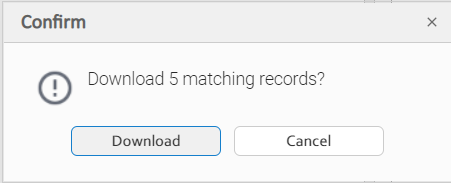
Before the selected command is executed, a confirmation pop-up displays. For example:
|
Set Priority >
|
| Displays a menu of run priorities that you can set for this task instance:
|
Show Variables |
| Displays all variables currently available to the task instance, including those inherited from a workflow, those passed in from a trigger, or those available globally. |
Skip |
| Places this task in the Skipped status. |
Skip Path |
| Skips this task instance and all of its dependent task instances. |
Unskip |
| Removes the Skip status from this task. |
View Blocking Ancestors... |
| Displays a dialog identifying blocking ancestors of a waiting task instance in a Workflow, if any exist. Only task instances that are in a workflow and have not started (that is: Defined, Waiting or Held status) will qualify. |
View In Workflow |
| Displays the Workflow Monitor for the parent Workflow of a selected task instance and highlights that task instance within the Workflow. |
View Parent |
| Displays the Workflow Task Instance Details of the parent Workflow, if applicable, of this task instance. |
View Predecessors/Successors |
| Displays a dialog identifying the predecessors / successors of this task instance in the Workflow, if any exist. |
Task Monitor Task Instances | ||
View Potential Matches... |
| For task instances in Running status; Displays a list of running task instances that have the potential to match the specifications for tasks being monitored by the running Task Monitor task instance. |
Tasks | ||
Clear Execution Restriction |
| Clears any Execution Restrictions that have been set for this task. |
Launch |
| Launches the task. |
Launch with Variables... |
| Launches this task with one or more variables that you will specify on a Task Variables pop-up dialog. |
Reset Statistics |
| Resets the run-time statistics that the Controller has gathered for this task. |
Run Command On Filtered > |
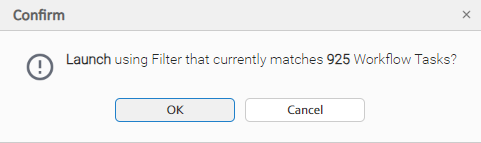
| Executes a selected command against all tasks that match the current filter. Before the selected command is executed, a confirmation pop-up displays. For example: |
Set Execution Restriction... |
| Allows you to sets Execution Restrictions for this task. |
View Parents |
| Displays a list of all parent workflows, if any, of this task. (Same action as View Parents button on Task Details.) |
Triggers | ||
Assign Execution User... |
| Displays a dialog that lets you select an execution user that overrides the execution user of task instances being launched by the trigger. Users not assigned the ops_admin role must provide the execution user credentials (User ID and Password) in order to assign the execution user to the trigger. Users must have the Assign Execution User Trigger permission in order to assign an execution user. |
Disable |
| Disables this trigger. (Same action as Disable button on Details.) |
Enable |
| Enables this trigger. (Same action as Enable button on Details.) |
Forecast... |
| Allows for the forecasting of a Workflow by specific date/time. |
List Qualifying Times |
| Lets you modify and display a list of qualifying times for this trigger (the next 30 dates and times when this trigger will be satisfied). |
Recalculate Forecast |
| Recalculates the forecast data for this trigger. |
Run Command On Filtered > |
| Executes a selected command against all triggers that match the current filter.
info
Before the selected command is executed, a confirmation pop-up displays. For example:
|
Set Skip Count... |
| Lets you perform a Set Skip Count action if you have the Set Skip Count Trigger permission, Update permission, or both. |
Trigger Now... |
| Immediately triggers all the tasks specified in this trigger. (Same action as Trigger Now... button on Trigger Details.) Optionally, you also can select to:
info If a Trigger Now... command is issued for an Enabled trigger that does not have an assigned Execution User, the trigger will launch its task(s) under the context of the user that enabled the trigger. If a Trigger Now... command is issued for a Disabled trigger that does not have an assigned Execution User, the trigger will launch its task(s) under the context of the user that issued the Trigger Now... command. If a Trigger Now... command is issued for an Enabled or Disabled trigger that has an assigned Execution User, the trigger will launch its task(s) under the context of the assigned Execution User. |
Unassign Execution User |
| Unassigns an execution user that had been selected to override the execution user of task instances being launched by the trigger. Users must have the Assign Execution User Trigger permission in order to unassign an execution user. |
Universal Templates | ||
Deselect All |
| Deselects all templates on the List/Load Built-In Universal Templates server operation list. |
Load |
| Loads all templates on the List/Load Built-In Universal Templates server operation list to the Universal Templates list. |
Restore Default Icon |
| Restores the default Universal Task icon to all Universal Tasks based on this Universal Template. |
Select All |
| Selects all templates on the List/Load Built-In Universal Templates server operation list. |
Users and Groups | ||
Permissions For Group |
| Exports user groups and their permissions (see Exporting Records to an Output File). |
Virtual Resources | ||
Reset Virtual Resource |
| Resets the Resource Used value of a renewable virtual resource to accurately reflect the actual number of resources currently in use. |
Workflow Task Instances | ||
Workflow Task Commands > |
| Displays a menu of the commands specific to Workflow task instances: |
Release Recursive |
| Releases this Workflow, and all of its task instances on Held Status, from Held status. |
View Children |
| Displays all children task instances of this Workflow task instance (and children task instances of any sub-Workflow task instance) and, optionally, their Predecessors and Successors within this Workflow. |
View Tree |
| Displays a tree view of this workflow task instance and its tasks, including children tasks of any sub-Workflow task, and, optionally, lets you display the Details for any of those tasks. |
View Timeline... |
| Displays the progress of a Workflow task instance in a timeline format. |
View Workflow |
| Displays the Workflow Monitor for this Workflow task instance. (Same action as View Workflow button on Details.) |
Workflow Tasks | ||
Workflow Task Commands > |
| Displays a menu of the commands specific to Workflow tasks: |
Clone... |
| Creates a copy of the Workflow, a copy of each task in the Workflow, and - optionally - copies of its Virtual Resources. |
Edit Workflow |
| Displays the Workflow Editor for this Workflow. |
Recalculate Forecast |
| Recalculates the forecast data for this workflow. |
Forecast... |
| Allows for the forecasting of a Workflow by specific date/time. |
View Children |
| Displays all children tasks of this Workflow task (and children tasks of any sub-Workflow task) and, optionally, their Predecessors, Successors, and Task Run Criteria within this Workflow. |
View Tree |
| Displays a tree view of this workflow and its tasks, including children tasks of any sub-Workflow task, and, optionally, lets you display the Details for any of those tasks. |
Launch |
| Launches the Workflow. |
Launch with Variables... |
| Launches this Workflow with one or more variables that you will specify on a Task Variables pop-up dialog. |
z/OS Task Instances | ||
z/OS Task Commands > |
| Displays a menu of the following actions: |
Confirm JCL Changes... |
| |
Force Resubmit |
| Force Resubmits the z/OS task instance. |
Deselect for Re-run |
| Deselects the selected job step(s) from being included in a z/OS job re-run. |
Select for Re-run |
| Selects the selected job step(s) for inclusion in a z/OS job re-run. |
Select for Re-run (Force) |
| Selects the selected non-Restartable job step(s) for inclusion in a z/OS job re-run. |
Select to End for Re-run |
| Selects the selected job step and all following job steps for inclusion in a z/OS job re-run. |
z/OS Tasks | ||
z/OS Task Commands > |
| Displays a menu of the following actions: |
Reset Override Statistics |
| Reset the override statistics used for automated JCL override clean-up. |