z/OS Installation - Sysplex
IBM provides the ability to cluster z/OS systems together using the IBM Sysplex technology, which is a combination of IBM hardware and software components. The individual z/OS systems are referred to as Sysplex members.
The IBM JES subsystem supports a Multi-Access Spool (MAS) configuration that allows for batch jobs to be distributed among participating JES subsystems. A JES MAS configuration may be used independently of a Sysplex environment or in combination with a Sysplex environment. When used in combination with a Sysplex environment, IBM recommends the JES MAS configuration match the Sysplex configuration.
The Universal Agent for z/OS Sysplex feature provides for the management of workload across all Sysplex members. This page describes the general architecture and design of the Universal Agent for z/OS Sysplex feature.
Sysplex Solution
From a workload management perspective, a z/OS Sysplex can be represented as a single z/OS image. A single-system view of the Sysplex is represented by a single Agent called the Primary agent which runs on any Sysplex member. Other agents, called Secondary agents, run on the other Sysplex members.
The sysplex_role Universal Broker configuration option is used to select the Sysplex role for an agent.
Neither the Universal Controller nor the Universal Agent for z/OS participate in the distribution of workload across the sysplex images. The controller simply executes z/OS tasks on the Primary z/OS agent that represents the Sysplex.
A batch job submitted to JES on one z/OS system may be routed by JES or by IBM Workload Manager (WLM) to any one of the Sysplex z/OS members. The routing or distribution of batch workload is based on JCL specifications, system configuration and the state of the Sysplex members.
Universal Controller starts a z/OS task by sending a task start request to the Primary Universal Agent for z/OS. The Agent submits the requested job to JES. The job can potentially execute on any one of the Sysplex members. The Agents installed in the z/OS Sysplex cooperate with each other to manage the execution of the job.
Each Agent in the Sysplex can provide complete job management capabilities regardless of which Agent in the Sysplex submitted the job to JES.
Job management capabilities include:
- Automatic data set cleanup prior to job execution.
- Tracking the execution of the job and job steps.
- Collecting and retrieving the job's JES sysout data sets.
The z/OS Agents use the IBM Cross-System Coupling Facility (XCF) for Agent-to-Agent communication within the Sysplex. The Agents utilize the XCF data sharing capabilities for message passing and sharing of common data structures.
UAG Sysplex
UAG for z/OS will create and join a Sysplex group if it is running Sysplex aware.
The XCF group name will consist of the characters UAG, followed by the first 4 (upper-case) characters of the system ID (system_id from UBRCFG00).
Each UAG will have a member name, which will be the group name appended with @ and followed by the MVS system name.
For example, UAG with a system ID of mndv, running on DVZOS202, would have a group name of UAGMNDV and a member name of UAGMNDV@DVZOS202.
UAG Sysplex System View
The Sysplex System View below illustrates the UAG deployment in a sample Sysplex environment. The Sysplex environment consists of two z/OS images, SYS1 and SYS2, and the Sysplex shared resources, JES, DASD, and XCF.
The following diagram illustrates a job submitted to one of two of the Sysplex members and the SMF exits that are called. The SMF exits reference the JME in ECSA and send events to the local UAGSRV via the event queue in z/OS High Common Storage.
- A Launch message is received by the Primary UAG.
- The Primary UAG writes a record to the Job Submission Checkpoint dataset, processes the JCL and submits it to the z/OS Internal Reader.
- The JCL passes through JCL conversion and interpretation. The UAGUJV exit is invoked and sends an Event message to UAG to prompt it to look for JCL errors that might have prevented the job from entering the execution phase. (JCL conversion and interpretation can happen on different processors in the system depending on the system configuration.)
- If a JCL error preventing the job from running is detected, a status message is sent to the Universal Controller and processing ends.
- Once the job starts execution (on whatever system), program UAGRERUN gets control as the first step in the job. UAGRERUN performs pre-processing necessary to run and track the job on the local z/OS system. It creates the JME in ECSA to allow the SMF exits to track the job through Step Initiation, Step End and Job End processing.
- As the job passes through Step End and Job End, Events are created on the Event Queue tracking the job's progress.
- Events are removed from the Event Queue by the UAGSRV instance running on the system and processed.
- In the case of a Primary UAG, Status messages are sent to the Universal Controller. In the case of a Secondary UAG, messages are queued to the XCF Message Queue. These messages are removed from the queue by the Primary UAG and Status messages are sent to the Universal Controller.
- In both cases, any requested output is written to the UNVSPOOL directory for retrieval by the Universal Controller.
- Any information required for eventual rerun processing is also sent to the Universal Controller.
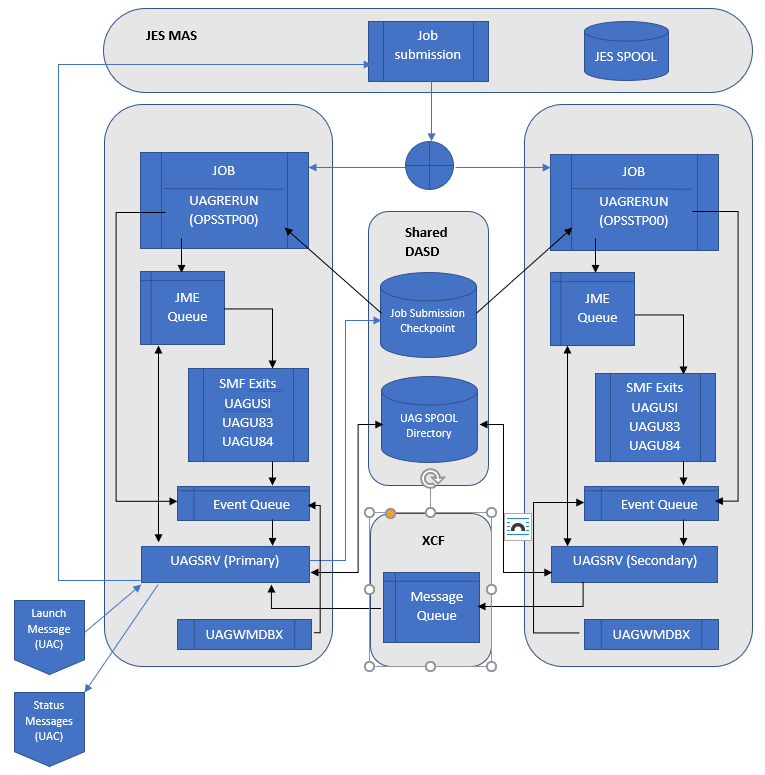
Each of the components is described in the following table:
JES MAS | JES MAS (Multi Access Spool) environment (aka JESPLEX), provides for sharing JES resources between multiple z/OS images. The JES MAS environment can be implemented independent of Sysplex; however, IBM recommends that a JES MAS environment matches the Sysplex environment. A job is launched by UAG by submitting the job's JCL to JES. The JES subsystem manages the entire life of the job, from JCL conversion, interpretation, job execution, managing job output, to finally purging the job resources. In a Sysplex environment, when a job is submitted to JES, JES or WLM, the JES subsystem may decide to route the job to another Sysplex member for processing. The JES spool volumes, where jobs and job outputs are queued, is available to all members of the JES MAS. |
|---|---|
Job Submission Checkpoint | The purpose of the JSC is to determine if a job should be tracked by UAG and to provide information to UAG to do so. JES may route the job to a different system for conversion/interpretation and execution. The system on which these steps take place cannot be determined prior to job submission. UAG utilizes shared DASD to maintain the Job Submission Checkpoint (JSC) data set. The dataset is a VSAM KSDS cluster. The Primary UAGSRV creates a job submission record in the JSC prior to submitting the job to JES. info Use the JSC_DATASET UAG configuration option to specify the name of a VSAM Job Submission Checkpoint cluster. The VSAM cluster must be defined on a DASD volume that is available to all members in the Sysplex. |
UAG SPOOL Directory | The UAG SPOOL directory is used by UAG to store spooled output for a job. At a minimum, the UAGRERUN report is stored here. Other datasets which might be stored here are the JESMSGLG, JESJCL and JESYSMSG datasets. UAG utilizes a shared zFS filesystem to mount the UNVSPOOL directory. This directory should be accessible to all members in the Sysplex. info Use the SHARED_MOUNT_POINT and SHARED_MOUNT_POINT_MODE configuration options to specify the name and mode (access permissions) of the directory where the UNVSPOOL directory should be mounted. info The JES_SYSOUT_RETENTION can be used to specify how long spooled output will be retained by UAG. info The UNVSPOOL directory should be mounted as Sysplex aware by specifying the RWSHARE parameter on the MOUNT command. Failure to do so will result in a UNV3333E error during broker startup. |
XCF Message Queue | XCF (Cross Coupling Facility) is a Sysplex component that provides services for communications and data sharing between Sysplex members. UAG utilizes a message communication channel using XCF services. Secondary UAGSRVs generate messages to the Primary UAGSRV to track the life cycle of a job. Secondary UAGSRVs do not communication directly with the Controller. The XCF Message Queue will survive across agent restart to preserve any tracking data. The XCF message Queue will be deleted if all agents in an agent group are shut down. info Use the CF_STRUCT_NAME UAG configuration option to specify the name of a Coupling Facility structure that will be used to communicate from the Secondary Agents to the Primary Agent. |
UAGRERUN | Program UAGRERUN is a component of UAG. A job step is inserted at the start of every job submitted by UAG which executes this program. UAGRERUN performs pre-processing necessary to run and track a job on a system. This includes, but is not limited to, creating the JME control block structure in ECSA to allow the UAG SMF exits to track the job. info UAGRERUN needs to be available to every job submitted by UAG on every Sysplex member. This can be accomplished by adding the load library containing UAGRERUN to the z/OS linklist. Alternatively, the RERUN_LOAD_LIBRARY configuration option can be used to specify the name of the APF authorized load library which contains the UAGRERUN program. This library would need to be made available to all members of the Sysplex. |
UAG SMF Exits | The UAG SMF exits are used to track a job submitted by UAG through its life cycle.
|
Event Queue | The Event Queue is an area in shared z/OS high common storage allocated for each agent. UAGRERUN and the SMF exits can queue event message to be consumed by the agent which owns the queue. The Event Queue is designed to survive across agent restarts to prevent loss of event data and to allow SMF exits to continue to provide tracking events in the event of an agent shutdown. The Event Queue will be deleted when z/OS is IPLed. info The HIGH_COMMON_STORAGE configuration option can be used to limit to amount of high common storage used by an agent. When the limit is reached, further tracking events will be lost. |
UAGWMDBX | UAGWMDBX is a z/OS WTO Message Data Block exit which looks for certain WTOs related to jobs submitted by UAG. For example: JCL errors. |
CF List Type Structure
UAG uses a CF List type structure with the following values:
Setting | Value |
|---|---|
List headers | 1 |
Lock table entry count | 1 |
Adjunct data | No |
Alterable | Yes |
Max number of list entries | 250 |
Max number of data elements | 500 |
Max number of data elements per entry | 128 |
Reference option | None |
Data element size descriptor | ElemIncrNum |
Data element size value | 2 |
Users can alter only the Max number of list entries and Max number of data elements settings.
IBM provides a CFSIZER web tool (Structure type OEM List ) which can be used to calculate the structure size. Given the input above, this tool returned the INITSIZE and SIZE values of 17M (at Coupling Facility Control Code Level 25). Please note that the sizes calculated by CFSIZER can vary (sometimes greatly) depending on the current CF level.
The structure name can be chosen by users and must be coded on the CF_STRUCT_NAME configuration option.
UAG uses this structure to communicate job tracking information from the Secondary agents to the Primary agent. List entries indicate events such as job start, step end and job end. List entries remain on the list until the primary agent has resources to process them. When the list structure is full, the secondary agents will wait until sufficient space is available before writing more tracking information. The required size of the structure is therefore dependent on the number of jobs being tracked, the number of job steps in those jobs and the resources available to the Primary agent to process the data.
File Monitor Support for Secondary Agents
File Monitors now function across a Sysplex. A File Monitor can be set, and the dataset Create, Change, or Delete will be detected on any system in the Sysplex where a UAG with the same system ID is running.
File Monitors will be detected while UAG is down as long as UAG was up when the File Monitor was set.
Exists and Missing File Monitors are resolved on the system where the Primary UAG is running. If a dataset is available only on a Secondary system, it will not be considered.
Configuration Parameters Used for Sysplex Configuration
Parameters in UBRCFG00
Name | Description |
|---|---|
system_id | All Primary and Secondary Brokers that belong to the same group must have the same system_id. Only the first 4 characters of the system_id value are recognized for uniqueness. When deploying multiple Sysplex groups within the same environment, each group's system_id must differ within its first 4 characters to ensure distinct XCF group names. For example, values such as |
sysplex_role | Select a value of primary for the primary agent; select a value of secondary for all others. |
unix_spool_data_set | All Brokers that belong to the same group must reference the same dataset name. The dataset must reside on shared DASD that is available to all Sysplex members. This file system should not be shared among Brokers that are not part of the same Sysplex group. |
mount_point | zFS mount point for non-shared UNIX file systems (currently only UNVDB). This mount point should not be shared between systems. |
shared_mount_point | zFS mount point for shared UNIX file systems (currently only UNVSPOOL). All Brokers that belong to the same group must use the same directory. This mount point should be available to all members in the Sysplex. In non Sysplex situations, this parameter can be omitted, and it will default to the value specified for mount_point. |
mount_point_mode | Mode (access permissions) to use during mount_point initialization. |
shared_mount_point_mode | Mode (access permissions) to use during shared_mount_point initialization. In non-Sysplex situations, this parameter can be omitted; it will default to the value specified for mount_point_mode. |
Parameters in UAGCFG00
Name | Description |
|---|---|
jsc_dataset | All Primary and Secondary agents that belong to the same group must use the same UNVJSC VSAM cluster. This cluster must be allocated on shared DASD that is available to all members in the Sysplex. Agents that are not part of the Sysplex group must use a different VSAM cluster. |
cf_struct_name | Name of the Coupling Facility structure which will be used to store the XCF Message Queue. All Primary and Secondary agents that belong to the same group must use the same structure. The structure should not be shared between agents that are not part of the same Sysplex group. |
netname | Defines the Agent ID as it appears in the Universal Controller. All Primary and Secondary agents that belong to the same Sysplex group must be configured with the same |
automatic_failover | If the value of the sysplex_role parameter in UBRCFG00 is primary or secondary, this parameter can be used to control automatic failover. Automatic failover allows a Secondary agent to become the Primary agent when the original Primary agent ends. Valid values:
Default is never. (Also see the AUTOMATIC_FAILOVER UAG configuration option.) |
Dataset and Resource Sharing Reference
The following table summarizes which datasets and resources can be shared across all Sysplex groups and which must remain unique per Sysplex group. This is particularly relevant when deploying multiple independent Sysplex groups within the same z/OS environment.
| Resource | Scope | Notes |
|---|---|---|
SUNVLOAD | Shared across all Sysplex groups | A single load library can be shared among all Primary and Secondary agents across all Sysplex groups. No duplication is required. |
SUNVNLS | Shared across all Sysplex groups | A single NLS dataset can be shared among all Primary and Secondary agents across all Sysplex groups. No duplication is required. |
UNVCONF | Unique per Agent | Each Agent requires its own configuration library. It is possible to share physical datasets and to use system symbols to provide uniqueness for values that require it. But, each Agent will treat the UNVCONF dataset as its own. |
UNVJSC (JSC VSAM cluster) | Unique per Sysplex group | Each Sysplex group requires its own VSAM Job Submission Checkpoint cluster, allocated on shared DASD accessible to all members of that group. It must not be shared between groups. |
UNVSPOOL (USS spool directory) | Unique per Sysplex group | Each Sysplex group requires its own UNVSPOOL directory, mounted as a shared zFS filesystem and accessible to all agents within that group. It must not be shared between groups. The filesystem must be mounted with the RWSHARE parameter to avoid UNV3333E errors at broker startup. |
UNVDB (local mount point) | Unique per Agent | The local mount point for non-shared file systems must not be shared between systems, nor can it be shared between Agents. This is true even for Agents not defined as part of a Sysplex group. |
When deploying two Sysplex groups, the result is two unique UNVCONF libraries, two unique UNVJSC VSAM clusters, and two unique UNVSPOOL directories, while a single SUNVLOAD and SUNVNLS are shared across all agents in both groups.
z/OS Console Commands
F <ubroker>,APPL=UAG,PRIMARY
This command causes an agent that is running in Sysplex Secondary mode to become a Primary agent until it is restarted or otherwise caused to become a Secondary agent.
If the agent is not running in Secondary mode, or a Primary agent is already active with the same system ID, the command will fail.
F <ubroker>,APPL=UAG,SECONDARY
This command causes an agent that is running in Sysplex Primary mode to become a Secondary agent until it is restarted or otherwise caused to become a Primary agent.
If the agent is not running in Primary mode, the command will fail.
F <ubroker>,APPL=SHUTDOWN, [ FAILOVER [ ,<sysname> ] | NOFAILOVER ]
When issued against a Secondary agent | This command behaves like the z/OS STOP command (P <ubroker>). |
|---|---|
When issued against a Primary agent | This command shuts down the Broker (and agent) while controlling the Sysplex failover behaviour: |
When issued without the FAILOVER or NOFAILOVER parameter | Failover will behave as configured by the automatic_failover parameter in UAGCFG00. |
When FAILOVER Is specified | An available Secondary agent will take over as Primary, regardless of how failover is configured. When the optional < |
When NOFAILOVER Is specified | No Secondary agent will take over as Primary, regardless of how failover is configured. |
Behaviour of the z/OS STOP console command with failover is identical to the F <ubroker>,APPL=SHUTDOWN command with no other parameters.
System Symbols in Sysplex Deployments
z/OS System Symbols are substitution variables resolved automatically by z/OS at the JCL or BPXPRMxx level. They are defined in the IEASYMxx parmlib member and can simplify the management of Sysplex deployments by reducing the need for duplicate or manually maintained JCL across multiple LPARs.
Common symbols relevant to Sysplex deployments include:
| Symbol | Description |
|---|---|
&SYSNAME. | The SMF system name of the local LPAR (1-8 characters). Unique per system. |
&SYSCLONE. | A 1-2 character abbreviation of the system name, defined in IEASYMxx. Unique per system. Useful for constructing short dataset name qualifiers. |
&SYSPLEX. | The name of the Sysplex to which the system belongs. Shared across all members of the same Sysplex. |
| Custom static symbols | User-defined symbols set in IEASYMxx. Can be used to represent a Sysplex group identity that is consistent across all LPARs in a group. For example, &UAGGRP. could be defined as GRP1 on all LPARs belonging to SysplexA and GRP2 on all LPARs belonging to SysplexB. |
Where System Symbols Are Resolved
On the z/OS platform, system symbols are resolved when a configuration value is first read by a Universal Agent component. This means symbols can be used directly within configuration file members such as UBRCFG00 and UAGCFG00, in addition to JCL DD statements and BPXPRMxx MOUNT statements.
| Context | Symbol Resolution Supported |
|---|---|
UBRCFG00 / UAGCFG00 member content | Yes, resolved when the value is first read |
| JCL DD statements (DSN= references) | Yes |
| Started task PROC parameters | Yes |
BPXPRMxx MOUNT statements | Yes |
| Environment variables | No |
Command line or command file options support symbol resolution only when the option is prefixed with a plus (+) character instead of the standard dash (-). See Configuration Methods for full details.
Recommended Uses
UBRCFG00 - LPAR-Unique zFS Dataset References
For zFS installations, the local database dataset is specified via the unix_db_data_set parameter in UBRCFG00 rather than a JCL DD name. Since system symbols are resolved in configuration file values, &SYSNAME. or &SYSCLONE. can be used directly in this parameter to automatically resolve to the correct LPAR-unique dataset without maintaining separate configuration members per LPAR.
unix_db_data_set UAG.LOCAL.&SYSNAME..UNVDB
This resolves to, for example, UAG.LOCAL.SYS1.UNVDB on one LPAR and UAG.LOCAL.SYS2.UNVDB on another, automatically. See UNIX_DB_DATA_SET for full details.
BPXPRMxx - Automatic zFS Mount per LPAR
The UNVDB local mount point (non-shared) can be managed via BPXPRMxx MOUNT statements using &SYSNAME. to ensure each LPAR mounts its own local zFS automatically at IPL without separate parmlib members per system.
MOUNT FILESYSTEM('UAG.LOCAL.&SYSNAME..UNVDB')
      TYPE(ZFS)
      MODE(RDWR)
      MOUNTPOINT('/u/uag/local/&SYSNAME.')
Custom Static Symbols - Sysplex Group Identity
For resources that must be consistent across all LPARs within a group but differ between groups (such as UNVCONF), a custom static symbol defined in IEASYMxx can represent the group-level identity. This allows a shared PROC to reference the correct group-scoped dataset on any LPAR without hardcoding.
For example, defining &UAGGRP. as GRP1 in IEASYMxx on all LPARs belonging to SysplexA and GRP2 on all LPARs belonging to SysplexB allows:
//UNVCONF DD DSN=UAG.&UAGGRP..UNVCONF,DISP=SHR
This resolves to UAG.GRP1.UNVCONF on SysplexA members and UAG.GRP2.UNVCONF on SysplexB members, using a single PROC definition.
Custom static symbols must be defined consistently across all LPARs that share the same Sysplex group. Verify IEASYMxx definitions on every member before relying on custom symbols in production.
Shared Dataset References - Avoid Per-LPAR Symbols
For datasets that must be identical across all members of a Sysplex group (such as UNVJSC and the UNVSPOOL shared mount path) use consistent literal names rather than per-LPAR symbols. Using a symbol that resolves differently on each LPAR (such as &SYSNAME. or &SYSCLONE.) for these resources would cause each LPAR to reference a different dataset, breaking the shared configuration required for proper Sysplex operation.
Multiple Sysplex Group Deployments
In environments where workload volume or throughput requirements exceed the capacity of a single Sysplex group, or where security requirements necessitate workload isolation, two or more independent Sysplex groups can be deployed within the same z/OS environment. Each Sysplex group operates as a fully independent installation with its own Primary agent, Secondary agents, UBROKER STC, and configuration resources.
Common drivers for this architecture include:
- Performance: High volumes of concurrent activity can create a bottleneck at the UAG level. Distributing agents across two Sysplex groups reduces the processing load on any single Primary agent.
- Security: Each UBROKER STC runs under its own user ID. When the
SECURITYconfiguration option is set toinheriton UAG, UCMD, or UDM components, task execution inherits the user account of the broker that started the agent. Deploying separate Sysplex groups with distinct STC user IDs allows workloads to be isolated by the user under which they execute, enforced by routing tasks to the appropriate group's Agent ID. See SECURITY - UAG configuration option for details.
Each Sysplex group consists of:
- One Primary agent (UBROKER STC configured with
sysplex_role=primaryin UBRCFG00) - One or more Secondary agents (UBROKER STCs configured with
sysplex_role=secondaryin UBRCFG00) - Its own unique UBROKER STC, UNVCONF library, UNVJSC VSAM cluster, and UNVSPOOL directory
Workload is distributed between Sysplex groups by configuring tasks in the Universal Controller to target the Agent ID of the desired group. The netname configuration value becomes the Agent ID under which the group is registered in the Controller.
Unique Configuration Requirements Per Sysplex Group
The following items must be unique for each Sysplex group and consistent across all agents within that group:
| Item | Scope | Details |
|---|---|---|
| UBROKER STC | Unique per Sysplex group | Each group requires its own dedicated UBROKER STC. |
UNVCONF | Unique per Agent | Each Agent requires its own configuration library. It is possible to share physical datasets and to use system symbols to provide uniqueness for values that require it. But, each Agent will treat the UNVCONF dataset as its own. |
netname (UAGCFG00) | Unique per Sysplex group; shared within group | Determines the agent name visible in the Controller. All agents in the same group must share the same netname. Each group must have a distinct netname. |
system_id (UBRCFG00) | Unique per Sysplex group; shared within group | Only the first 4 characters are recognized for uniqueness. All agents in the same group must share the same system_id. Each group must have a distinct value in the first 4 characters (e.g., PRD1 vs. PRD2). |
cf_struct_name (UAGCFG00) | Unique per Sysplex group; shared within group | The Coupling Facility structure used for XCF messaging must not be shared between Sysplex groups. |
UNVJSC VSAM cluster | Unique per Sysplex group; shared within group | Must reside on shared DASD accessible to all members of the group. Must not be shared between groups. |
UNVSPOOL directory | Unique per Sysplex group; shared within group | A shared zFS mount, accessible to all members of the group. Must not be shared between groups. Must be mounted with RWSHARE. |
UBROKER Port Mapping
Each UBROKER STC requires a unique inbound port. The default port for the first Sysplex group is typically 7887. Subsequent groups should use distinct port numbers (e.g., 7888).
It is recommended to configure all agents within the same Sysplex group to use the same port number for consistency and ease of troubleshooting.
When UCMD or UDM components are configured with SECURITY=inherit, inbound connections execute tasks under the user ID of the UBROKER STC that owns the agent. In this configuration, ensuring that UCMD and UDM jobs target the correct Sysplex group's port is necessary to guarantee execution under the intended user. When security isolation between Sysplex groups is a requirement, jobs must be directed to the port mapped to the appropriate group's UBROKER.
When multiple Sysplex groups are deployed for performance reasons rather than security isolation, distributing inbound UCMD and UDM connections across groups is optional. The primary performance benefit is at the UAG status processing level. Broker load distribution should be evaluated based on observed performance.
Failover Prioritization When Sysplex Groups Share LPARs
When two Sysplex groups have agents running on overlapping LPARs, the automatic_failover parameter in UAGCFG00 must be carefully planned to prevent a double-primary scenario, where both groups promote a Primary agent on the same LPAR simultaneously.
The recommended approach is:
- Designate one agent per group as
always_primary. This is the preferred Primary for that group under normal conditions. - Designate all remaining agents in the group as
secondary_primary[n], using the optional integer to control failover ranking. Lower integers indicate higher priority. - For the agent that serves as
always_primaryin one group, configure the corresponding agent in the other group assecondary_primary32, making it a last-resort failover candidate only. - Invert this relationship for the second group.
The following example illustrates the recommended configuration for a deployment of 8 agents across two groups (SysplexA and SysplexB), with one agent per LPAR and both groups sharing agents across all 8 LPARs:
| Agent | LPAR | SysplexA Role | SysplexB Role |
|---|---|---|---|
| P001 | LPAR1 | always_primary | secondary_primary32 |
| P002 | LPAR2 | secondary_primary1 | secondary_primary4 |
| P003 | LPAR3 | secondary_primary2 | secondary_primary5 |
| P004 | LPAR4 | secondary_primary3 | secondary_primary6 |
| P005 | LPAR5 | secondary_primary32 | always_primary |
| P006 | LPAR6 | secondary_primary4 | secondary_primary1 |
| P007 | LPAR7 | secondary_primary5 | secondary_primary2 |
| P008 | LPAR8 | secondary_primary6 | secondary_primary3 |
In this configuration, each group prioritizes its own preferred failover candidates before crossing over to the other group's agents. SysplexA fails over P001 → P002-P004 → P006-P008 → P005 (last resort). SysplexB inverts this, failing over P005 → P006-P008 → P002-P004 → P001 (last resort). This ordering minimizes the risk of both groups promoting a Primary on the same agent simultaneously.
See the AUTOMATIC_FAILOVER UAG configuration option for full details on valid values and behavior.
System Symbol Considerations for Multiple Sysplex Groups
System Symbols can reduce manual configuration effort when managing multiple Sysplex groups across shared LPARs. However, their use requires careful planning to avoid unintentionally breaking shared resource references.
See System Symbols in Sysplex Deployments for full guidance and examples.