OMS Server High Availability
Universal Message Service (OMS) is a communication middleware component providing network communications between the distributed Universal Automation Center components. OMS availability is a core requirement for a majority of the Universal Automation Center services. Universal Automation Center deployment requiring near 100% reliability and availability requires an OMS High Availability (HA) cluster deployment.
An OMS HA cluster consists of one active OMS Server and one or more inactive (passive) OMS Servers sharing a common OMS message database. OMS clients are configured with a list of OMS server addresses, one address for each OMS Server in the HA cluster. If the active OMS Server become unavailable, one of the inactive OMS Servers automatically assumes the role of the active OMS Server. OMS clients detect that the original active OMS Server is not available and automatically fail-over to the new active OMS Server. The shared OMS message database Ensures that no messages are lost when there is a change in the active OMS Server.
The following diagram illustrates a simple HA cluster configuration. It consists of two OMS Servers deployed on two different machines. OMS Server 1 is the active OMS Server and OMS Server 2 is the inactive OMS Server. Both OMS Servers share a common OMS message database. The OMS clients connect to the active OMS Server.
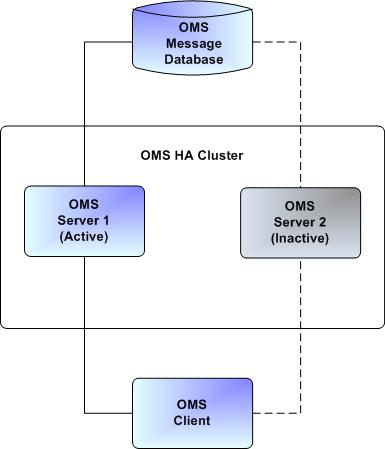
High Availability Configuration
There are two options for how to set up a High Availability environment for OMS:
- Shared Filesystem Architecture - Store the message database and the lock file for the Active Node selection on a shared network filesystem.
- Data Replication Architecture - Store the message database locally on every node and perform data replication between the Active and Passive Nodes. Rather than filelock-based Active Node (Leader) selection, a Distributed Consensus algorithm performs Leader selection based on a voting mechanism.
If deciding which architecture to use:
- The Shared Filesystem Architecture is recommended if your environment has a reliable and fast shared storage with file-based locking support. This setup provides higher performance and faster nodes switchover.
- The Data Replication Architecture is recommended if shared storage is not available or too expensive, and performance is not the key factor.
See the documentation on each architecture for information on how to configure each option.
OMS Clients
OMS clients are configured with the address of the OMS Server used for network communications. OMS clients support using both a single, non-HA OMS Server as well as an OMS Server HA cluster. In the case of an HA cluster, the OMS clients support automatic fail-over between the OMS Server cluster members. OMS clients utilize an OMS HA cluster by configuring the OMS clients with an ordered, comma-separated list of OMS Server addresses. The OMS Servers specified in the address list must be members of the same HA cluster. If an OMS Server is specified that is not a member of the same OMS HA cluster, the results are unpredictable.
Below is an example OMS Server HA cluster address list.
oms1.acme.com,oms2.acme.com,oms3.acme.com
OMS clients will connect to the first OMS Server in the OMS Server address list, oms1.acme.com. If that OMS server is not available, the OMS client will attempt to connect to the next OMS Server in the list, oms2.acme.com, and so on, until it has successfully connected to an OMS Server. If none of the OMS Servers are available, the OMS client will wait for a period of time and try again to establish a connection with one of the OMS Servers. When an OMS client establishes a connection, it will utilize the OMS Server for network communications. If the connection fails for any reason, the OMS client will start the process of establishing a connection with the next OMS Server in the OMS Server list until it is successful.
See the documentation for a specific OMS client for details on how the OMS Server address list is specified for that OMS client.