OMS Server HA Data Replication Architecture
There are two possible ways to set up a High Availability (HA) OMS environment: the Shared Filesystem Architecture, and the Data Replication Architecture (introduced in UAC 7.9).
This page explains the Data Replication Architecture. The Architecture Details section explains how the Data Replication setup works. The Configuration Steps section explains how to configure this architecture.
Architecture Details
Core Components
The high-level architecture consists of the following components:
- Message Database
- NuRaft Integration
- State Machine Bridge
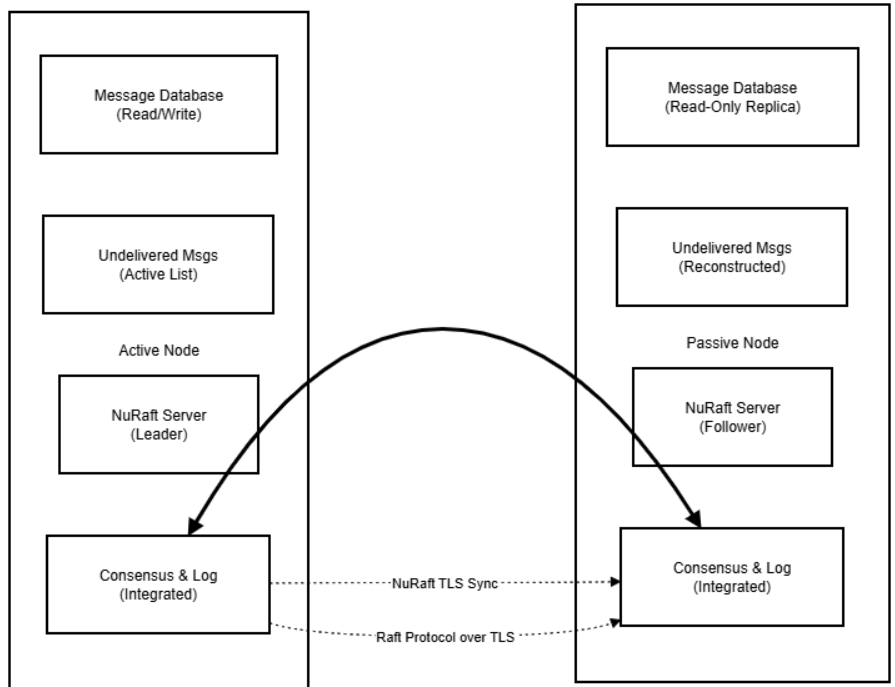
The Message Database itself is unchanged from the Shared Filesystem Architecture.
The NuRaft Integration handles the following responsibilities:
- Leader election (determines active node)
- Log replication (synchronizes operations across nodes)
- TLS-encrypted communication between nodes
- Failure detection via heartbeats
- Split-brain prevention through majority consensus
The State Machine Bridge connects NuRaft log entries to message database operations, allowing message database updates on Passive Nodes.
Two-Log System
The Data Replication system involves two distinct types of logs that serve different purposes:
1. Message Database (Local, Persistent)
The Message Database is used to reconstruct undelivered messages list on startup, and it serves as the permanent source of truth for message state history.
The basic role of the Message Database is unchanged from the Shared Filesystem Architecture, but in the Data Replication Architecture, the database is local to each node.
2. NuRaft Consensus Log (Distributed, Persistent)
The NuRaft Consensus Log is a single distributed log managed by NuRaft across all cluster nodes. It contains all the application’s operations that need to be replicated. It provides both consensus and replication functionality. Entries are applied into the message database via the state machine interface.
Only persistent messages are replicated, since replication is needed to synchronize the message database between nodes. Non-persistent messages (e.g. heartbeat, hello) are not critical, since those do not impact the business logic and the system has facilities to recover from the loss of such messages.
Failover Behavior
When a node becomes Active after Failover:
- NuRaft log continues from where it left off, since the Log was synchronized.
- A list of undelivered messages is reconstructed from the local Message Database.
- The node begins accepting new client connections.
Example Failover Scenarios
1. Active Node Failure with Successful Failover
Any Distributed Consensus Algorithm requires a quorum for the leader election process. This implies a requirement to have a minimum of 3 Nodes in the environment. However, NuRaft allows you to have 2 Nodes in the HA environment by adding a special Witness Service (Witness Node) to be able to achieve quorum. This service is not needed for 3+ Nodes, but required for a 2-Node environment.
A Witness Node participates in a leader election process and receives replication log entries, but it never gets elected as a leader under normal circumstances. The only exception is when it is the only node containing the freshest replication log. In this case, a Witness Node takes leadership, synchronizes the replication log with other nodes, and steps down immediately to initiate a new leader election.
This allows the system to be set up with only 2 OMS Servers that can become Active, while the Witness Node is only used to facilitate the elections.
2. Network Partition - Split Brain Prevention
Split brain is the condition when nodes become isolated and there is no quorum for leader selection. Split brain prevention is achieved by automatic stepdown of an Active Node if it gets isolated.
3. Passive Node Long Outage - Snapshot Recovery
NuRaft has built-in protection mechanisms for long-term nodes failures:
- Snapshots: NuRaft periodically creates snapshots of committed state.
- Log Compaction: Old log entries are automatically compacted.
- Bounded Memory: Configurable limits prevent memory exhaustion.
- Automatic Catchup: Built-in snapshot transfer for nodes that are far behind.
Client Connection Handling
All clients preserve the same behavior as with the Shared Filesystem Architecture. The client protocol remains unchanged as well.
The Failover procedure on the client side also remains unchanged: round-robin node selection until a successful connection attempt. Failover time: 15-30 seconds detection + 30-60 seconds recovery.
Configuration Steps
Configuring a High Availability (HA) cluster with a Data Replication architecture consists of the following steps:
Step 1 | Update the configurations of each OMS Server with the CLUSTER_NODE_ID, CLUSTER_NODE_ENDPOINT, and CLUSTER_MEMBERSHIP string. The membership string should be the same for all OMS Servers in the cluster. |
|---|---|
Step 2 | After restarting, the OMS Servers should automatically connect. |
Step 3 | Configure UAG and the Controller to connect to the HA cluster. This process is the same as with the Shared Filesystem Architecture. |
Example Setup with Three OMS Servers
This is an example of three-server setup. Configurations for each OMS Servers are given below:
OMS 1 (on oms1.acme.com):
cluster_node_id 1
cluster_node_endpoint localhost:9000
cluster_membership [10]1:oms1.acme.com:9000,[5]2:oms2.acme.com:9000,3:oms3.acme.com:9000
OMS 2 (on oms2.acme.com):
cluster_node_id 2
cluster_node_endpoint localhost:9000
cluster_membership [10]1:oms1.acme.com:9000,[5]2:oms2.acme.com:9000,3:oms3.acme.com:9000
OMS 3 (on oms3.acme.com):
cluster_node_id 3
cluster_node_endpoint localhost:9000
cluster_membership [10]1:oms1.acme.com:9000,[5]2:oms2.acme.com:9000,3:oms3.acme.com:9000
See the documentation on each configuration option for more details:
For additional configuration options regarding Data Replication behavior, see:
- LOGFILE_MAX_GENERATIONS
- LOGFILE_MAX_SIZE
- REPLICATION_LOGFILE_DIRECTORY
- SNAPSHOT_DISTANCE
- VERIFY_REPLICATION_NODE_IP
Backward Compatibility
The Data Replication OMS architecture was introduced in UAC version 7.9. Older Universal Agent and Controller versions (pre-7.9) can still communicate with OMS using the new architecture. However, replication between OMS and older OMS Server versions will not be possible.