Modifying Agent Configurations
To modify agent configurations - that is, to modify the configuration option values of an agent - perform the following steps:
Step 1 | Select an agent from the Agent tree. The Configuration tree then lists all configurations of that Agent. |
|---|---|
Step 2 | Select a configuration from the Configuration tree. The Configuration Options table then lists all options, and their current values, for that configuration. |
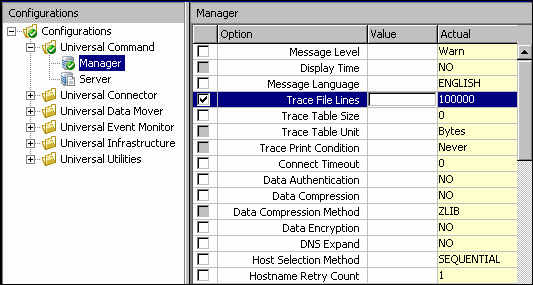
Step 3 | In the Configuration Options table, click the Commit check box of an option whose value you want to modify (see below). info An option with a gray Commit check box (such as Display Time) is a dependent option. It can be selected for modification only if the independent option (with a white Commit check box) immediately preceding it has been selected. Consecutively listed dependent options all are dependent on the independent option immediately preceding them.
This causes the following to occur:
|
Step 4 | In the Value field, enter a modified value for the option (that is, a different value than Actual value) either by:
|
Step 5 | Press the Enter key, or click the mouse anywhere outside that Value field, to validate the modified value. |
Step 6 | If the modified value is invalid, a warning message displays.
|
Step 7 | Select and modify other values, as desired. |
Undoing / Redoing Table Actions
You can undo multiple actions, and redo multiple undone actions, performed in the Configuration Options table.
- To undo an action, either select Undo from the I-Management Console Edit menu or press Ctrl+Z.
- To redo an undone action, either select Undo from the I-Management Console Edit menu or press Ctrl+Y.