I-Management Console Commit Queue
The Commit Queue application lets you view the committed configurations.
It also lets you cancel any commit that has not yet completed (see Cancelling a Commit).
Accessing Commit Queue
To access the Commit Queue application, click the Commit Queue panel at the bottom left corner of the I-Management Console screen. The Commit Queue screen then displays.
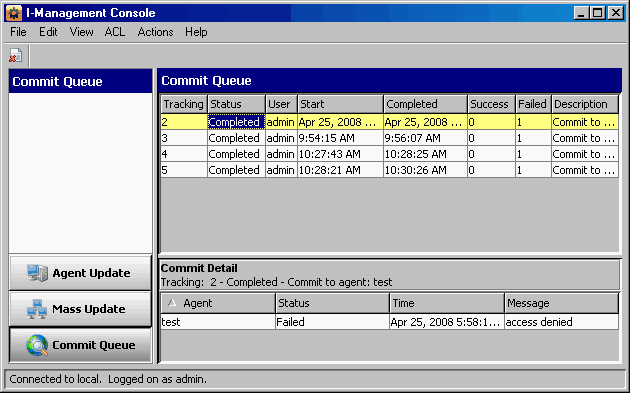
In addition to the Menu Bar and Tool Bar, the Commit Queue screen is comprised of two regions:
- Commit Summary provides summary information about each commit.
- Commit Detail provides detail information about a commit selected in the Commit Summary.
Commit Summary
The Commit Summary region of the Commit Queue screen displays a row of summary information for each committed configuration.
The following table describes the information in each row.
Information | Description |
|---|---|
Tracking | Tracking number of the commit. |
Status | Pending, Hold, Cancelled, or Completed. |
User | User that performed the commit. |
Start | Start time of the commit. |
Completed | Time that the commit was either Completed or Cancelled. |
Profile | Profile name (if the commit was performed through Agent Update, this field contains the Agent name). |
Description | Description of the profile provided by the user at the time of the commit. |
Success | Number of Agents successfully completing the commit. |
Failed | Number of Agents who failed to commit. |
Commit Detail
The Commit Detail region of the Commit Queue screen displays detailed information for a configuration selected in the Commit Summary region.
The following table describes this information.
Information | Description |
|---|---|
Agent | Agent that is the target of the commit. |
Status | Pending, Success, Failed, or Cancelled. |
Time | Time when the commit was performed on the Agent. |
Message | Informational message for a failed commit to an Agent. |
Cancelling a Commit
You can cancel any commit that has not completed.
To permanently cancel a commit from completing, perform the following steps:
Step 1 | Click on a row in the Commit Summary region of the Commit Queue screen. |
|---|---|
Step 2 | Select either:
|
If you try to cancel a commit that already has been completed, the following dialog displays.
