Universal Controller 6.7.0.0 Release Notes
Universal Controller release 6.7.0.0 contains the following high-level features; for a complete list of all the included features and fixes, please refer to the Universal Controller 6.7.x Maintenance list.
Activity Enhancements
Backlog | Title | Description |
|---|---|---|
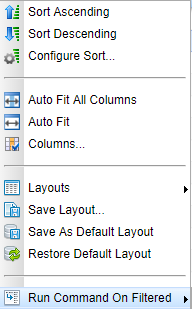
B-05326 | Activity - Ability to issue commands (that support multiple selection) from a list based on current filter. | The Activity Monitor supports a maximum of 50 results per display page. This has previously impeded the ability to issue concurrent commands to more than 50 active tasks at once. The Activity Monitor now supports the ability to issue commands against all task instances in the current filtered activity list. Once you have filtered the Activity Monitor to contain the tasks that you want to issue a command against, simply right click on the List Header and select the Run Command on Filtered option:
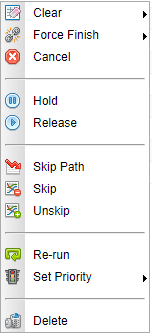
You will be presented with a list of available commands to execute against all tasks in the filtered list:
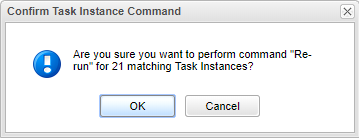
Once you select a command, you will see a confirmation dialog box where you can confirm or cancel this action:
|
B-10601 | Task Lists - Ability to issue commands (that support multiple selection) from a list based on current filter. | Similar to B-05326, the various Task lists now supports the "Run Command On Filtered" option to issue commands against all task instances in the current filtered task list. |
Agent Cluster Broadcast Enhancements
Backlog | Title | Description |
|---|---|---|
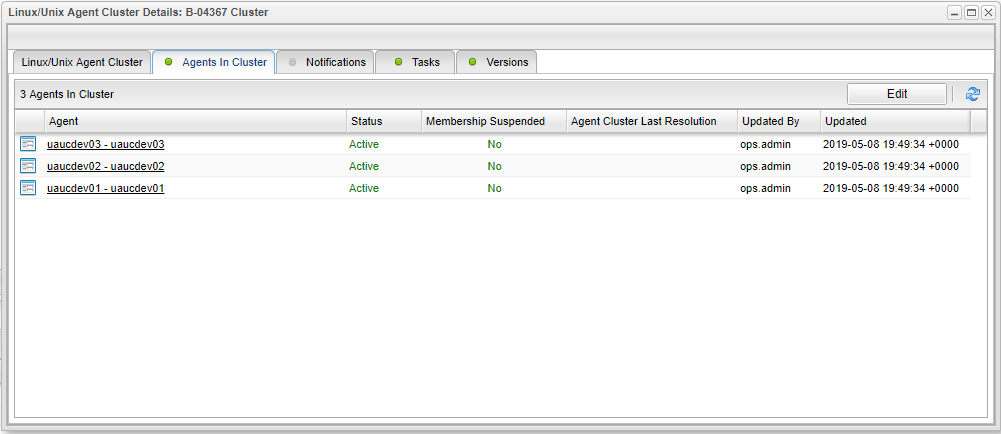
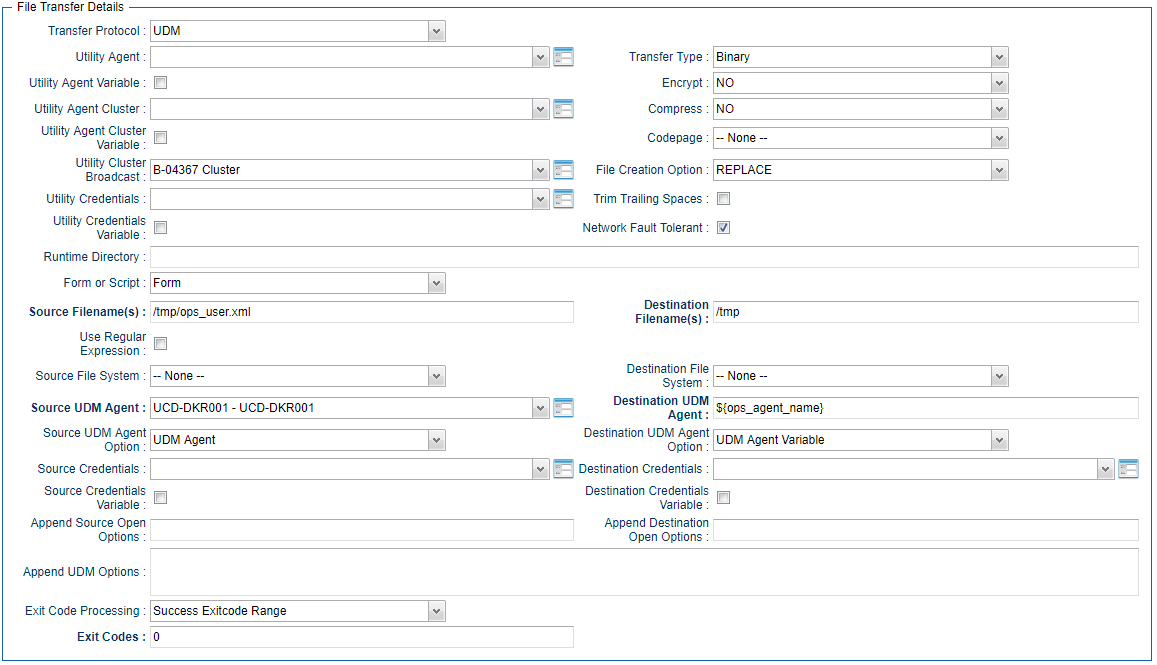
B-04367 | Add Cluster Broadcast for UDM File Transfer Tasks Utility Agent | File Transfer Tasks using the UDM Transfer Protocol now support the Agent Cluster Broadcast functionality for the Tasks Utility Agent. For Example, a Linux/Unix Agent Cluster contains the following three Agents:
In order to configure a UDM file Transfer Task to transfer files from agent UCDDKR001 - UCDDKR001 to each of the Agents in this Agent Cluster, you would configure the UDM file Transfer Task as follows:
When you Launch a UDM File Transfer Task, the Controller will create a unique instance of the Task for each of the three agents in the Agent Cluster Definition. Consequently, the /tmp/ops_user.xml file on UCD-DKR001 will be transferred to /tmp/ops_user.xml on each of the three agents in the Agent Cluster Definition. tip If you also include the For Example:
|
B-10316 | Ignore Inactive or Suspended Agents for Cluster Broadcast | When you create or update an Agent Cluster definition, you now have the option to prevent agents from being used by the Cluster Broadcast function if an agent, or its membership in the Cluster, is either Suspended or Inactive. Two new check-boxes in the Agent Cluster Details have been provided to facilitate this new functionality. By default, these options are unchecked; to use the new functionality, you must check the required option(s).
|
B-05576 | Add capability for Cluster Broadcast Variable in tasks where Cluster Broadcast is used. | All tasks that can use the Cluster Broadcast functionality now support selection of the Agent Cluster for Cluster Broadcast via a variable. |


File Transfer Task / FTP File Monitor Enhancements
Backlog | Title | Description |
|---|---|---|
B-10763 | System configuration of allowable protocols for File Transfer and FTP File Monitor Tasks | System administrators now can optionally restrict which protocols are available for File Transfer and FTP File Monitor tasks. Two new system properties - "File Transfer Task Exclude Protocols" and "FTP File Monitor Task Exclude Protocols" - allow the administrator to select which file transfer protocol(s) (FTP, SFTP, FTPS) should be unavailable for selection within the corresponding task type. |
Platform Support Updates
Backlog | Title | Description |
|---|---|---|
B-10223 | Upgrade packaged Oracle JDBC Driver to ojdbc8 | Universal Controller is now shipped with the Oracle JDBC Driver ojdbc8 version 18.3. |
B-10314 | Validated Support for Open JRE 8 | Universal Controller versions 6.6.0.0 and higher are validated to support Open JRE 8. |
B-10318 | Validated Support for MySQL 8.0 | Universal Controller versions 6.6.0.0 and higher are validated to support MySQL 8.0. |
B-10320 | Validated Support for Oracle 18c | Universal Controller versions 6.6.0.0 and higher are validated to support Oracle 18c. |
B-10321 | Validated Support for SQL Server 2017 | Universal Controller versions 6.6.0.0 and higher are validated to support SQL Server 2017. |
Reporting Enhancements
Backlog | Title | Description |
|---|---|---|
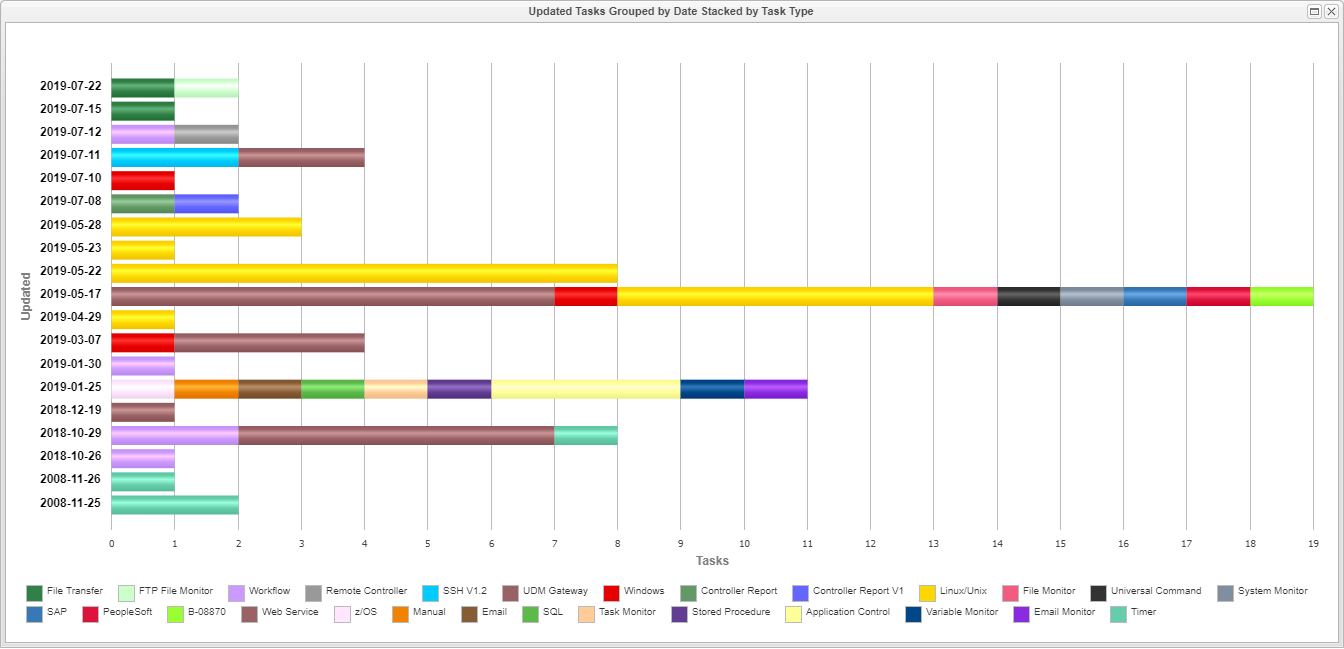
B-10376 | Report Chart Group by for Date/Time fields to specify Range of Grouping | Previously report charts that grouped data by any of the available date/time fields based the grouping on the way the date/time field is stored in the database (typically at the millisecond level). This enhancement allows for the creation of more meaningful reports that can group chart data with the following levels of granularity: For example, the following report shows the number of Task Definitions updated each day stacked by the Task Type:
|
B-10828 | New Example Reports | The following build in reports have been added:
|

SAP Task Enhancements
Backlog | Title | Description |
|---|---|---|
B-10695 | SAP Load balanced Connection in UC should support the client parameter. | The SAP Connection definition for Connection Type = Load Balanced now supports the SAP Client parameter. |
Security Updates
Backlog | Title | Description |
|---|---|---|
B-10351 | Review & Fix @Consumes and @Produces annotations for all Web Service APIs. | During PEN (penetration testing), it was noted that some of the Universal Controller Restful Web Services APIs did not perform adequate HTTP Content Type Validation. When POSTing or PUTting new data, the client will specify the Content-Type (for example, application/xml or application/json) of the incoming data. The server should never assume the Content-Type; it should always check that the Content-Type header and the content are the same type. A lack of Content-Type header or an unexpected Content-Type header should result in the server rejecting the content with a 406 Not Acceptable response. info Deprecated APIs have not been addressed with this change. It is recommended to use the newer API that replaces the depreciated API function. |
B-09908 | Allow configuration of the system property "jdk.xml.entityExpansionLimit" | During PEN (penetration testing), it was noted that vulnerability to XML Expansion Attacks was controlled based on the Java Environment configuration. We have decided to a) remove the possibility of such an attack, and b) provide configuration in Universal Controller to override the Java configuration. An administrator will now be able to specify the Entity Expansion Limit property jdk.xml.entityExpansionLimit in the opswise.properties. Universal Controller will initialize the system property to a default value of 1 if the property is not specified in the opswise.properties or on start-up with -Djdk.xml.entityExpansionLimit=<limit>. Therefore, for a default deployment, Universal Controller will now limit the number of entity expansions to 1. |
B-10597 | Restrict Access to Database Information | The System Details Widget can be accessed by all users, and, by default, it displays information about the Universal Controller Database Connection. A new Administration Property (System Details Database Information Restricted) has been introduced to restrict the Database Connection information to users with the ops_admin role and/or the ops_server_operation_admin role. The default value of False preserves the behavior of previous Universal Controller releases. Setting a value of True will restrict the visibility of this information. |
B-10276 | Allow users to see or display only those Business Services they have permissions for | A new System Property has been introduced to change the product behavior regarding how Business Services are displayed. Default Behavior is that all users can see all Business Services in all definitions. By setting the "Business Service Visibility Restricted" property to true, users will only see Business Services that they have explicit permission to at least read. It should be noted that this is based on any permission and is not granular to specific definition types; for example, a user who has Update permission to Tasks for Business Service "ABC" will also see Business Service "ABC" when browsing Agent Definitions even if the user have not been granted explicit read access. |
Universal Task Enhancements
Backlog | Title | Description |
|---|---|---|
B-06219 | Choice Field Dependency - Show If Field/Show If Field Value | For Universal Tasks when creating a new Universal Template, you now can specify to Show or Hide certain user-defined fields depending on the value of a choice field. Firstly, create the Choice Field and Choice Values you want to use to decide if other fields are displayed. When Creating a Field that you want to be shown only if specific choices are selected from the Universal Task Details drop-down, you now can select a choice field in the Validation section of the Universal Task Field definition and specify which values would display this new field in the Universal Task Details. You additionally can control whether blank space is reserved in the Universal Task Details when this field is hidden.
|
B-06293 | Boolean Field Dependency - Show If Field/Show If Field Value | For Universal Tasks, when creating a new Universal Template, you now can specify to Show or Hide certain user-defined fields depending on the value of a Boolean field. Firstly, create the Boolean Field you want to use to decide if other fields are displayed. When Creating a Field that you want to be shown only if a specific selection is specified from the Universal Task Details drop-down, you now can select a Boolean field in the Validation section of the Universal Task Field definition and specify which value would display this new field in the Universal Task Details. You can additionally control whether blank space is reserved on the Universal Task Details when this field is hidden.
|
B-09484 and B-09507 | Read Only & Hide options for Universal Template Fields | Customers now have the ability to deliver Universal Tasks that have certain defaulted fields marked as Read Only or completely Hidden from the end user. For example, if a specific Universal Task can run only on a Specific Server with a Specific Credential, the Universal Template Administrator now can Hide these fields in the Universal Task or mark these fields as Read Only. The default fields will be grouped at a high level for visibility purposes; each group can be restricted only as a whole: The following options are available for each of the above Field Groupings:
|
B-10609 | Universal Template - Copy | Universal Template Administrators can now copy an existing Universal Template from the Universal Templates list. The new copy option has been implemented as a right-click option in line with the copy capability for other definition types. |



Virtual Resource Enhancements
Backlog | Title | Description |
|---|---|---|
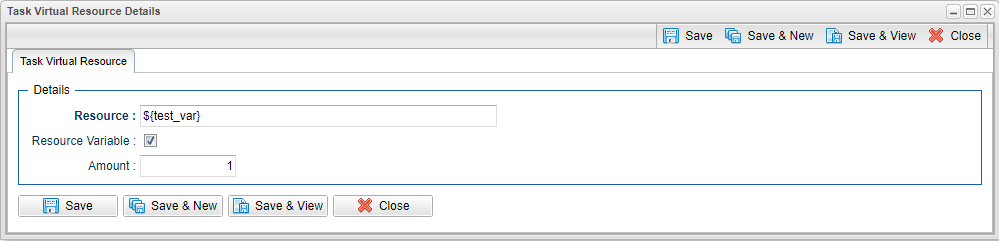
B-04017 | Task Virtual Resource Variable Support | When specifying Task Virtual Resources, you now can use a variable instead of having to select a specific Virtual Resource. If the variable does not resolve to a valid Virtual Resource when the task is launched, the task will go to a Start Failure Status with an appropriate message indicating the error.
|
Workflow Task Operational Enhancements
Backlog | Title | Description |
|---|---|---|
B-05590 | Allow the running of commands that make sense for task instances even if their workflow container is complete. | Universal Controller now supports the following commands for task instances (excluding sub-workflows) in a completed Workflow task instance. By completed, we mean that the Workflow task instance is in an Inactive end state (SKIPPED, FINISHED, or SUCCESS). Re-running a task instance in a completed Workflow will not re-run successor task instances, since the dependencies have already been satisfied. If a task instance is re-run in a completed Workflow and the task instance fails, conditional processing will not force finish the task instance; it will remain in Failed status. |
Web Service API Enhancements
Backlog | Title | Description |
|---|---|---|
B-09736 | Web Service API - New Task Instance Status Query and Display Information | The following new fields have been added as query parameters and added to the response payload of the Task Instance Query API:
|