Universal Controller 6.6.0.0 Release Notes
Universal Controller release 6.6.0.0 contains the following high-level features; for a complete list of all the included features and fixes, please refer to the Universal Controller 6.6.x Maintenance list.
Attach Local Files to an Email
Backlog | Title | Description |
|---|---|---|
B-03133 | Ability to attach local files as email attachment | This addresses the requirement to allow file attachments for Email tasks and also now supports binary files (such as pdfs) as attachments for Email Tasks and Email Notifications. Previously restrictions existed because file attachments to Email Notifications were treated as output objects which did not support binary file types. Similarly email Tasks do not have a relationship with an agent and so were unable to fetch a remote file to attach. To allow these capabilities customers can drop the required file attachments into a directory defined by a New opswise property to define a "single" directory location where files can be attached from. This is not configurable from the UI for security reasons, this should be enabled by the system admin rather than the UC admin. Every 10 minutes the opswise.properties will be read and if the opswise.email.attachments.local.path has changed, the new value in the opswise.properties will then be used within the Controller. The files to be attached would need to be on a file system accessible to all Universal Controller cluster nodes within the HA configuration so that regardless of which cluster node is Active, the file can still be accessed. Customers will be responsible for delivering files to the specified local email directory, and for maintaining (i.e. deleting) files in this directory. Customers should also be aware that all Email tasks (and potentially other types of tasks) will be able to access files in this directory. Once the opswise.email.attachments.local.path has been set, the option to "Attach Local File" will be available in the Email Notifications and Email Tasks. |
Bundle and Promote Security
Backlog | Title | Description |
|---|---|---|
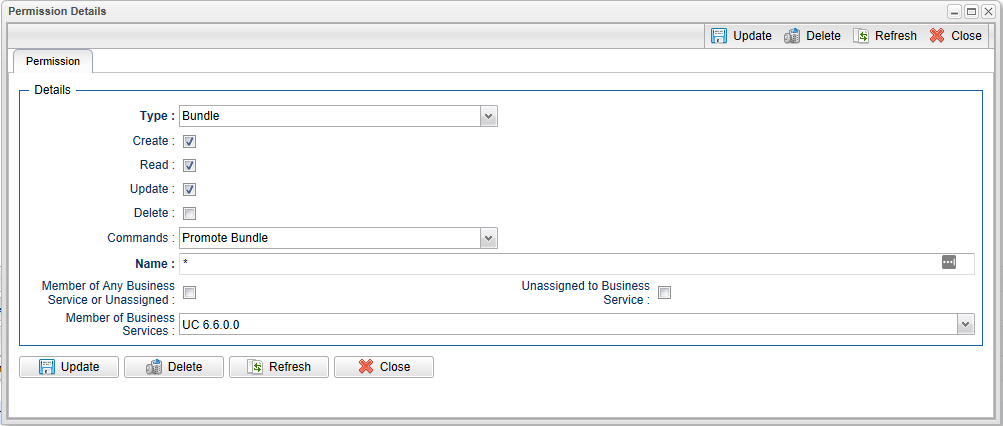
B-09939 | Business Services Security and Visibility for Bundles | In order to allow more granular administration bundles can now be assigned to business services and a new user / group permission type for "Bundle" has been added to control how users can interact with Bundles. The existing "ops_bundle_admin" remains to provide global access to the bundle feature.
|
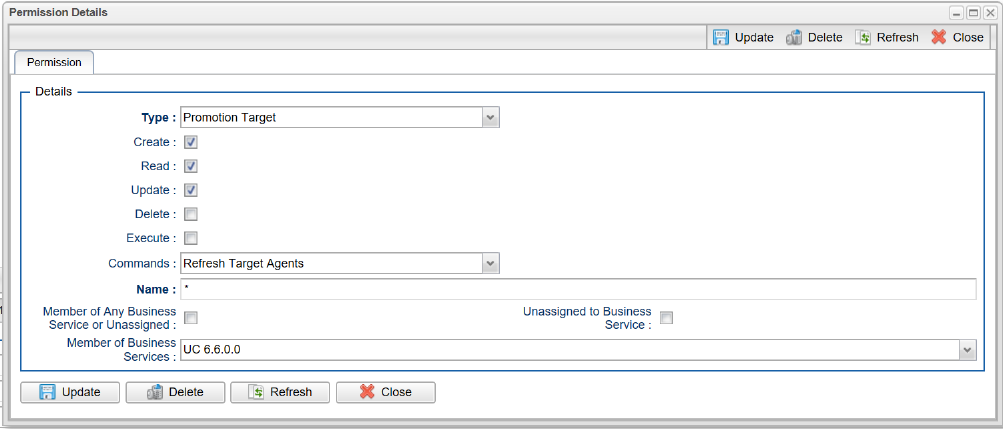
B-09938 | Business Services Security and Visibility for Promotion Targets | In order to allow more granular administration promotion targets can now be assigned to business services and a new user / group permission type for "Promotion Target" has been added to control how users can interact with promotion targets. The existing "ops_promotion_admin" remains to provide global access to the promotion targets.
|
B-10286 | Optionally allow bundle-less promotion for users without ops_promotion_admin role | To augment the features delivered in B-09938 and B-09939 a new system property "Bundleless Promotion With Execute Permission Permitted" has been added to optionally allow promotion of definitions outside of a bundle without requiring the ops_promotion_admin role. By default this property is "false", meaning that the Promote… action is disabled unless a user has the ops_promotion_admin role. For a user with the ops_promotion_admin role, the Promote… dialog allows selection of any pre-existing promotion target. When the property is set to "true", the Promote... action will be available to users who have "execute"permission to at least one promotion target. Again, for a user with the ops_promotion_admin role, the Promote… dialog allows selection of any pre-existing promotion target. |
Calendar and Trigger Enhancements
Backlog | Title | Description |
|---|---|---|
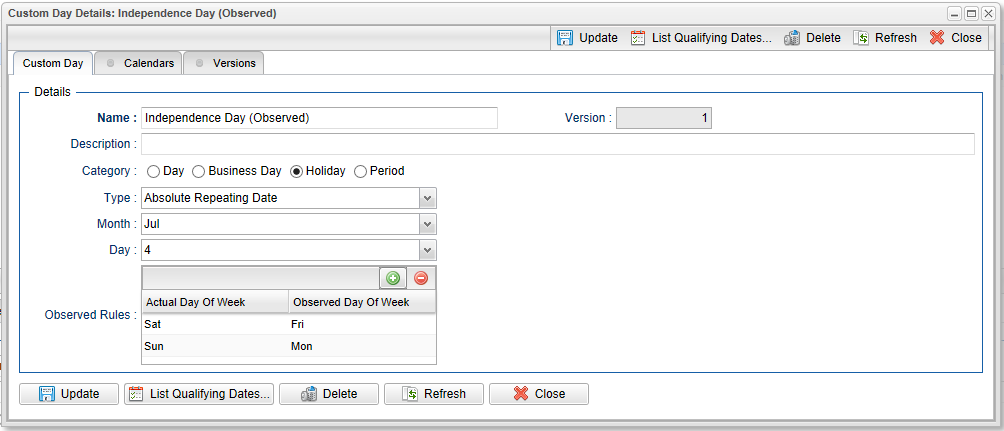
B-06728 | Calculate Observed Public Holidays | This provides the ability to support "observed" public holidays without the need for a custom day list of dates. For example if July 4th falls on a Saturday the observed July 4th would be Friday July 3rd and if July 4th falls on a Sunday the observed July 4th would be Monday July 5th.
|
B-09506 | Time Trigger expanded to include "Week" as a Complex Qualifier | For Example "Run on 1st Business Day of week".
warning A Time Trigger using "Week" Date Qualifier may skip qualifying times when using certain complex restrictions. 1.Create a Time Trigger with "Complex" Day Style using the following: 2.List Qualifying Times for trigger. This should should list times for every day of the week.
* Month, Year also exhibit the problem. The work-around is to use "Simple" Day Style if possible instead of "Complex" Day Style. For example, Daily instead of Every Day of Week. |
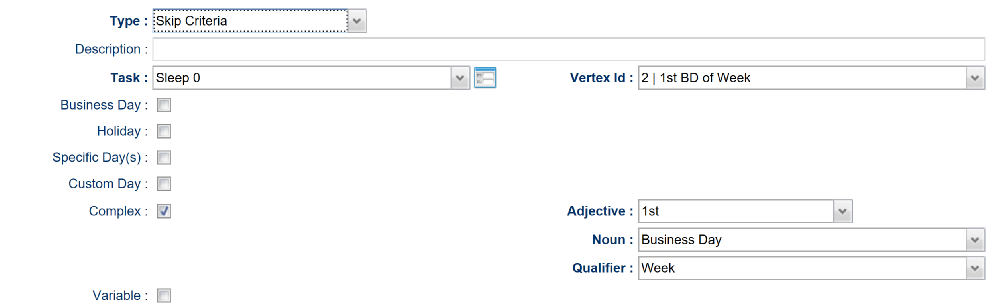
B-03218 | Run Criteria expanded to include "Week" as a Complex Qualifier | For Example "Skip on 1st Business Day of Week".
|
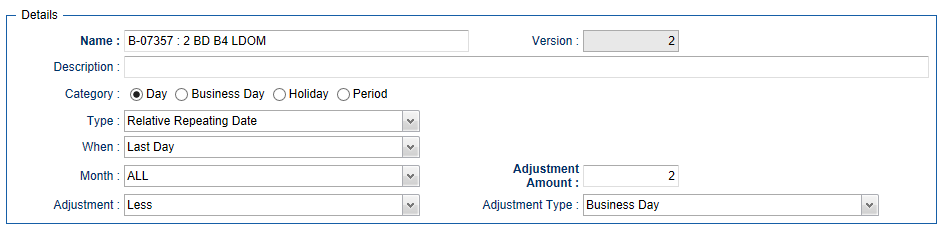
B-07357 | Custom Days (Relative Repeating Date) Add “Last Day” & “Last Business Day” to the When Clause | For Example "Run 2 Business Days before the Last Day of the Month".
|
B-04047 | Automatic purging of old Custom Day dates from Date List | A new System Property has been added to allow customers to automatically purge old dates in a Custom Day of type Date List. If the System Property “Purge Dates From Custom Day List Older Than” is set, then after midnight when the log is rolled over, part of the post log rollover will now purge any dates out of Custom Day (Date List) that are older than the number of days set as the System Property value. For example, if the System Property is set to 7, then any dates older than 7 days will be automatically removed from Date List - Custom Days. |
B-07148 | Add Nth and Nth Amount to Time Trigger Restrictions - Complex Restriction - Adjective | In the Restrictions section of the Time Trigger Definition you could previously specify 1st, 2nd, 3rd, 4th, First and Last. Support has been added for Nth and Nth amount. For example, this will enable restrictions for 10th Day of Month. |
B-09498 | New System Property to Control the Minimum Frequency in Seconds for a Time Interval on a Time Trigger | New System Property "Time Trigger Minimum Frequency in Seconds". This allows customers to restrict the creation of new Time Triggers with a time Interval less that the value specified in this property. |

File Monitor Task Enhancements
Backlog | Title | Description |
|---|---|---|
B-03621 | Be able to specify a minimum file size for Monitor Type = Create | When monitoring for new files with the File Monitor Task you can now optionally also specify "Minimum File Size" and the "Minimum File Scale" (i.e.Bytes, KB, or MB) as an additional filter criteria. This means that when a new file matching the "Monitor Files" criteria is found, the File Monitor will wait until the file also meets the Minimum File Size" specification is met. |
New Output Functions and Out Retrieval Enhancements
Backlog | Title | Description |
|---|---|---|
B-03412 | Add function to retrieve predecessor task output by specific line. | Two new functions have been added to allow access to specific lines from a task's output. As with the existing task output functions you will need to both Retrieve the output automatically and check the Wait for Output option to ensure that the task's output is available for processing.
These functions can be used in task set variable actions to allow access to specific lines from the output of a task.
For Example STDOUT Contains: License_OS_Type UNIX A set Variable Action For Status Success uses the new function:
And the Global Variable is set as follows:
For Example STDOUT Contains: License_OS_Type UNIX A set Variable Action For Status Success uses the new function:
And the Global Variable is set as follows:
|
B-05005 | Automatic output retrieval only on task failure | This enhancement introduces a new check box "Failure Only" for task types that support automatic output retrieval. If the Failure Only option is checked the automatic output retrieval will only occur if the task status is FAILED (or transitions through a FAILED status).
|






New Security Roles
Backlog | Title | Description |
|---|---|---|
B-09347 | Service Role and Complementing Administration Roles | New security roles have been added to facilitate the setup of a "service" user who can be enabled to administrate and maintain the UC product to perform tasks such as upgrading, applying maintenance, configuration of system properties, etc. without needing the ops.admin role and consequently without access to workload definitions and task instance data. ops_service ops_ldap_admin ops_oms_admin ops_property_admin ops_server_operation_admin ops_sso_admin Other existing Roles that may be relevant to the ops_service function:
|
On Delete Validation for Credentials
Backlog | Title | Description |
|---|---|---|
B-09385 | Add on-delete validation for credentials | Deleting a Credential is now prohibited if any references exist for the Credential. |
Results Set Processing (*Change in Default Behavior*)
Backlog | Title | Description |
|---|---|---|
B-09427 | Add support for decimals to Task "Result Set Processing" comparison operators (>, >=, <, <=). | For the greater than (>), greater than or equal (>=), less than (<), and less than or equal (<=) operators, the Universal Controller, by default, will now attempt to parse the String values as floating point values, rather than integer values, allowing proper numerical comparison when the values being compared are both floating point values, or a combination of integer and floating point values. While this is a behavior change from previous releases, we believe this would be the expected behavior and have made it the default. The following functionality in the Universal Controller relies on this functionality and should be regression tested. The regression testing should not be limited to the above operators, but all supported operators for the specific feature being regression tested.
|
SAP Connection Enhancements
Backlog | Title | Description |
|---|---|---|
B-09940 | SAP Connection Enhancement - New Options added to SAP Connection Form | The SAP Connection form has been enhanced to include the following SAP Connection Parameters, so that customers no longer have to use the RFC configuration file (sapnwrfc.ini) to specify these parameters.
|
Server Operations
Backlog | Title | Description |
|---|---|---|
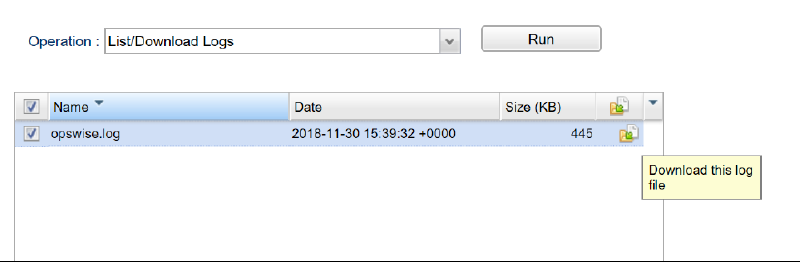
B-10115 | List/Download Opswise log files via the Client GUI | New Server Operation that lists the available "opswise log" files for the current cluster node and allows the user to select one or more logs for download to their local machine for viewing.
|
UI Changes / Enhancements
Backlog | Title | Description |
|---|---|---|
B-10224 | Relabeling of the Shorted Estimated End Time, and Longest Estimated End Time, for consistency. | In the Task Instance the computed estimated end times were previously displayed as Shortest Estimated End Time, and Longest Estimated End Time. For consistency with the Task Definition these have been relabeled to Lowest Estimated End Time and Highest Estimated End Time. |
B-10217 | Add simple search to Configuration - Properties List Grid | The Configuration Properties List has been enhance to provide a "simple search" filtering option.
|

Universal Task Enhancements
Backlog | Title | Description |
|---|---|---|
B-08870 | Array Field Support | New Universal Template Field Type to support input of name value pairs in Universal Tasks. Also includes the following new functions: convertArrayFieldFieldVariable getArrayFieldVariableValue |
B-06366 | Choice Field, Allow Empty | When using the Choice Fields in a Universal Template you can now allow an empty choice. The Universal Template Field form will display a new Allow Empty Choice checkbox when the Choice field type is selected. When using this option users of the generated Universal Task will be able to clear this field in the form, also a blank selection will be available from the choice drop down. The variable associated with this field will return a null value if blank is selected. |
B-06294 | Conditionally Required Fields | When defining Fields in the Universal Template you can now make the fields conditionally required based on the specific value of a Boolean field now as well as the previously available Choice field. |
Variables
Backlog | Title | Description |
|---|---|---|
B-05636 | Increase supported variable value length from 1024 to 4000. | The maximum size for a variable value can now be specified up to 4000 characters in length. |
B-10166 | New Task Instance Variables for Task Statistics | We have introduced four new built-in variables for a task instance, specifically, ops_user_estimated_end_time, ops_avg_estimated_end_time, ops_highest_estimated_end_time, and ops_lowest_estimated_end_time, which resolve to the task instance User Estimated End Time, Average Estimated End Time, Highest Estimated End Time, and Lowest Estimated End Time, respectively, in the server's time zone. For example,
If the date/time value for any of the above is NULL, the variable will remain unresolved, consistent with other date/time built-in variables. You can use the
|
Virtual Resource Enhancements
Backlog | Title | Description |
|---|---|---|
B-09853 | Virtual resource order processing optimizations | A number of optimizations have been implemented to improve the performance for Virtual Resource Processing where tasks are associated with large numbers of Virtual Resources:
|
Web Service API Enhancements
Backlog | Title | Description |
|---|---|---|
B-10167 | Support 'inheritance' property for Actions in the Create Workflow RESTful API request | Supports creation of Workflows with Workflow Level Actions via the Web Service Create Workflow API |
B-09857 | List Task Instance Variables (Show Variables) | New Web Service RESTful API to return task instance variables. Provides API access to the "Show Variables" feature in the user interface. |
B-09771 | Delete Scheduled Bundle Promotion | New Web Service RESTful API to delete a currently scheduled bundle promotion. |
B-10124 | Cancel Scheduled Bundle Promotion | New Web Service RESTful API to cancel a currently scheduled bundle promotion. |
B-08515 | API CRUD & List for Universal Task Templates | New Web Service RESTful API to Create, Read, Update, Delete, and List Universal Task Templates. |