Heirloom: Elastic Batch
Disclaimer
Your use of this download is governed by Stonebranch's Terms of Use.
Version Information
Template Name | Extension Name | Version | Status |
|---|---|---|---|
Elastic Batch | ue-cs-elastic-batch | 1.4.0 | Fixes and new Features are introduced. |
Refer to Changelog for version history information.
Overview
The Heirloom Computing Elastic Batch Platform (EBP) is a cloud environment for running IBM z/OS-compatible JCL batch jobs.
This Universal Extension allows users to submit and monitor JCL batch jobs on the Elastic Batch Platform straight from the Universal Controller. The submitted Universal Task reflects the live status of the batch job, retrieves its execution logs on completion, and supports restart and exit-code handling for failed runs.
Key Features
Feature | Description |
|---|---|
Submit JCL Job | Submits a JCL job to the Elastic Batch Platform, provided inline or referenced by name from an EBP library location, and reflects the live job status on the Universal Task. |
Wait and Retrieve Logs | Polls the running job at a configurable interval until it reaches a terminal state and retrieves its execution logs on completion. |
Restart and Exit-Code Control | Restarts a failed job from the last failed step or a specified step, and determines task success using highest step condition code or SCC testing. |
AWS Secrets Manager Authentication | Retrieves Elastic Batch Platform credentials from AWS Secrets Manager using the IAM role attached to the EC2 instance, or uses static Resolvable Credentials. |
Stop and Resume Commands | Interacts with running and completed jobs through Stop and Resume Dynamic Commands. |
Requirements
This integration requires a Universal Agent and a Python runtime to execute the Universal Task.
Area | Details |
|---|---|
Python Version | Requires Python 3.11, tested with Agent bundled python distribution. |
Universal Agent Compatibility |
|
Universal Controller Compatibility | Universal Controller Version >= 7.7.0.0. |
Network and Connectivity | Network connectivity to the Elastic Batch Platform is required. When AWS Secrets Manager authentication is used, connectivity to AWS Secrets Manager and permission to read the secret through the EC2 instance IAM role are also required. |
Supported Actions
There is one Top-Level action controlled by the Action Field:
Submit a JCL job to the Elastic Batch Platform. The JCL can be supplied inline through the JCL script field, or by reference through JCL File Name (either as the path of a file on the agent, or as the name of a JCL member resolved from an EBP library location). When Wait for Success or Failure is selected, the task polls the job at the configured Polling Interval until it reaches a terminal state, retrieves its execution logs, and sets the task exit code from the batch result according to the selected Exit Code Processing mode. When the task instance is rerun after a failure, the job is restarted from the last failed step, or from a specified step, instead of being submitted again.
Action Output
- EXTENSION
- STDOUT
The extension output provides the following information:
exit_code, status_description: General info regarding the task execution.invocation.fields: The task configuration used for this execution. For more information refer to exit codes table.result.errors: List of errors that might have occurred during execution.
Examples:Successful execution
Failed execution
When Fetch Execution Logs is selected, the extension streams the job's retrieved execution log and per-step output to STDOUT. When it is cleared, STDOUT is empty and the raw job details are returned as Extension Output instead.
Configuration Examples
Example: AWS Secrets Manager authentication, inline JCL, wait with log retrieval
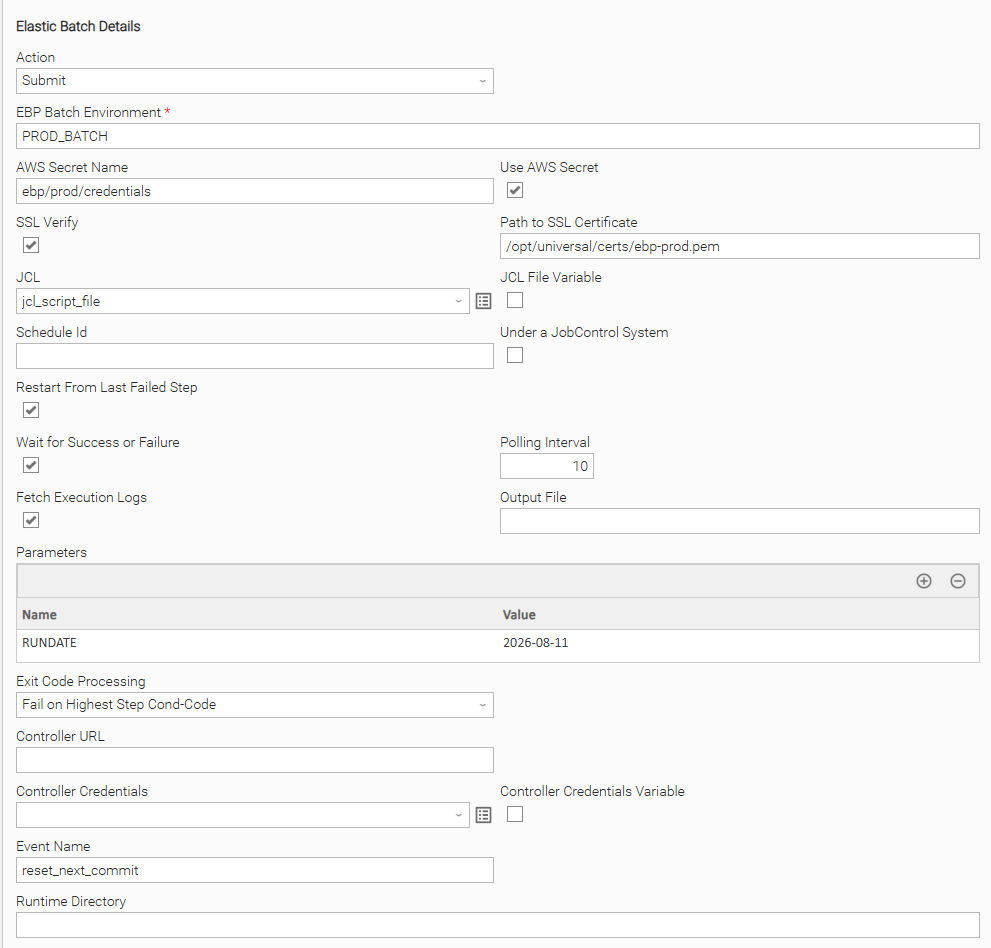
Submits an inline JCL script to the Elastic Batch Platform. Authentication uses AWS Secrets Manager: Use AWS Secret is selected and AWS Secret Name references the secret holding the Elastic Batch Platform credentials, resolved through the EC2 instance IAM role. The JCL is provided directly in the JCL script field (JCL File Variable cleared). Wait for Success or Failure is selected with a Polling Interval of 10 seconds, and Fetch Execution Logs retrieves the execution logs when the job completes. Task success is evaluated using "Fail on Highest Step Cond-Code".
Example: Static credentials, JCL by name, restart from last failed step
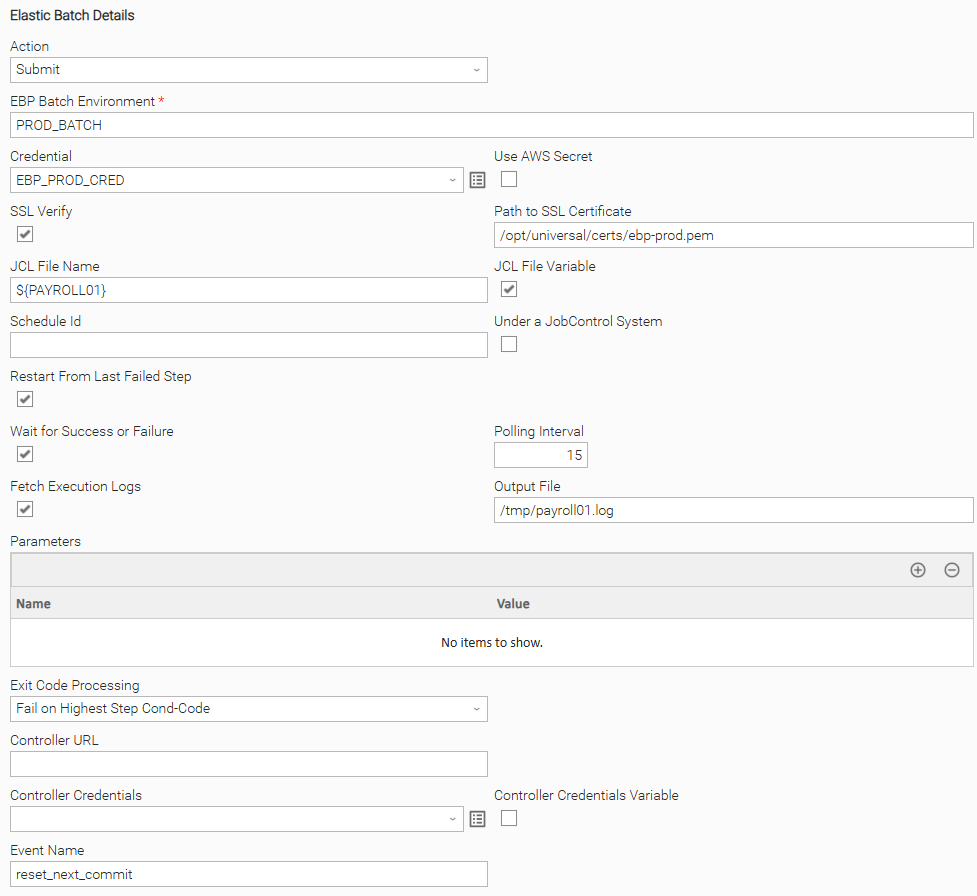
Submits a JCL job referenced by name from an EBP library location. Authentication uses static Resolvable Credentials (Use AWS Secret cleared, Credential set). JCL File Variable is selected and JCL File Name holds the JCL name. Restart From Last Failed Step is selected so a rerun resumes from the last failed step rather than from the beginning. Wait for Success or Failure is selected.
Example: Submit with SCC exit-code processing and Controller connection
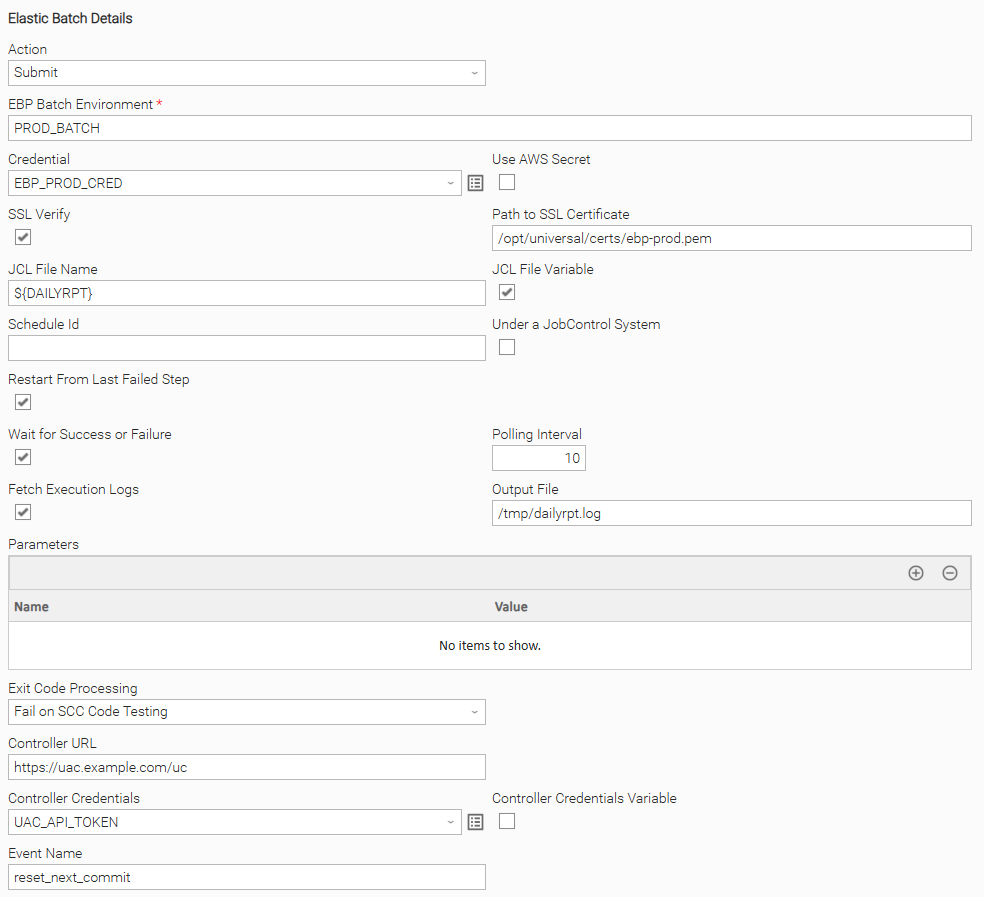
Submits a JCL job and evaluates task success using "Fail on SCC Code Testing". The Controller URL and Controller Credentials fields are set so the extension can publish action events and support the Resume Dynamic Command. Fetch Execution Logs is selected and Output File directs the retrieved log to a file on the agent.
Input Fields
Name | Type | Description | Version Information |
|---|---|---|---|
Action | Choice | The action performed on task execution. Available options:
| Introduced in 1.0.0 |
EBP Batch Environment | Text | The name of the Elastic Batch Platform batch environment the job runs in. | Introduced in 1.0.0 |
Credential | Credential | The Resolvable Credentials (Runtime User and Password) for the Elastic Batch Platform batch environment. This field is visible when Use AWS Secret is "false". | Introduced in 1.0.0 |
AWS Secret Name | Text | The name or ARN of the AWS Secrets Manager secret holding the Elastic Batch Platform credentials. The secret value must be a JSON object with This field is visible when Use AWS Secret is "true". | Introduced in 1.0.0 |
Use AWS Secret | Checkbox | Check to retrieve the Elastic Batch Platform credentials from AWS Secrets Manager instead of using Resolvable Credentials. Defaults to "true". | Introduced in 1.0.0 |
SSL Verify | Checkbox | Check to verify the SSL certificate of the Elastic Batch Platform endpoint. When cleared, certificate verification is disabled. Defaults to "true". | Introduced in 1.0.0 |
Path to SSL Certificate | Text | The path and file name of the CA certificate bundle on the agent file system, used to verify the Elastic Batch Platform endpoint. When left empty, the system default trust store is used. This field is visible when SSL Verify is "true". | Introduced in 1.0.0 |
JCL | Script | The JCL to be executed, provided inline as a script. This field is visible when JCL File Variable is "false". | Introduced in 1.0.0 |
JCL File Name | Text | The JCL to be executed, resolved in one of two ways: when the value is the path of a file that exists on the agent, that file's contents are submitted; otherwise the value is treated as the name of a JCL member resolved from an EBP library location. A value that ends in This field is visible when JCL File Variable is "true". | Introduced in 1.3.4 |
JCL File Variable | Checkbox | Check to reference the JCL by name or path through JCL File Name instead of providing it inline through the JCL script field. Defaults to "false". This field is visible when Action is "Submit". | Introduced in 1.3.4 |
Schedule Id | Text | The schedule identifier used for CA7 compatibility, passed to the job on submit as the This field is visible when Action is "Submit". | Introduced in 1.0.0 |
Under a JobControl System | Checkbox | Check when the job runs under a JobControl System, which passes This field is visible when Action is "Submit". | Introduced in 1.0.0 |
Restart From Last Failed Step | Checkbox | Check to restart the job automatically from the last failed step when the task instance is rerun. Only applies on a rerun (that is, when the Batch JOB ID output field is already populated from the previous run). Defaults to "true". | Introduced in 1.2.0 |
Restart Step | Text | The step name from which the job is restarted on a rerun. This field is visible when Restart From Last Failed Step is "false". | Introduced in 1.2.0 |
Wait for Success or Failure | Checkbox | Check to keep the task running and poll the job until it reaches a terminal state. When cleared, the task submits the job and completes immediately without waiting for it or retrieving logs. Defaults to "true". This field is visible when Action is "Submit". | Introduced in 1.0.0 |
Polling Interval | Integer | The interval in seconds between job status checks. Defaults to This field is visible when Wait for Success or Failure is "true". | Introduced in 1.0.0 |
Fetch Execution Logs | Checkbox | Check to retrieve the job's execution logs when the task completes and stream them to STDOUT. When cleared, the raw job details are returned as Extension Output instead. Defaults to "true". This field is visible when Wait for Success or Failure is "true". | Introduced in 1.0.0 |
Output File | Text | A base path and file name on the agent to which retrieved step output is written. Each step output file is written to a separate file named This field is visible when Fetch Execution Logs is "true". | Introduced in 1.0.3 |
Parameters | Array | Name/value parameters passed to the job on submit as symbolic parameters. | Introduced in 1.0.0 |
Exit Code Processing | Choice | The method used to set the task exit code from the batch job result. Available options:
A job that ends with ABEND, is ABORTED, or returns error messages always falls back to Highest processing. | Introduced in 1.1.0 |
Controller URL | Text | The base URL of the Universal Controller, used by the Reset next commit Dynamic Command to publish the resume event. | Introduced in 1.3.9 |
Controller Credentials | Credential | The Universal Controller credentials. A Runtime User and Password, or a Personal Access Token provided in the Token field, can be used. | Introduced in 1.3.9 |
Event Name | Text | The name of the resume event published to the Universal Controller by the Reset next commit Dynamic Command. Defaults to "reset_next_commit". | Introduced in 1.3.9 |
Output Fields
The following output-only fields provide better visibility during the execution of Universal Task Instances.
Name | Type | Description | Version Information |
|---|---|---|---|
Batch JOB ID | Text | The identifier of the submitted batch job on the Elastic Batch Platform. | Introduced in 1.0.0 |
Batch Job Name | Text | The name of the submitted batch job. | Introduced in 1.2.0 |
Batch Status | Text | The last observed status of the batch job. | Introduced in 1.2.0 |
Failed / Last Step | Text | The failed step, or the last successful step, of the batch job. | Introduced in 1.2.0 |
Max Return Code | Text | The maximum condition code (MAXCC) reported by the batch job. | Introduced in 1.2.0 |
Instance Id | Text | The Universal Task Instance identifier. | Introduced in 1.3.9 |
Environment Variables
Environment Variables can be set from the Environment Variables task definition table.
Environment Variable Name | Description | Version Information |
|---|---|---|
UE_AWS_REGION | The AWS region used when retrieving credentials from AWS Secrets Manager. When set, it is used directly and the EC2 instance metadata service lookup is skipped. | Introduced in 1.4.0 |
UAC_SSL_VERIFY | Controls whether SSL certificate verification is performed for outbound requests made by the extension. | Introduced in 1.0.0 |
Cancellation and Rerun
- In case of cancellation, a cancel request is sent to the Elastic Batch Platform to stop the running batch job, and the task instance completes with exit code
0. - In case of rerun, the previously submitted job is detected from the populated Batch JOB ID output field and restarted rather than submitted again. When Restart From Last Failed Step is selected the job restarts from the last failed step; otherwise it restarts from the step named in Restart Step.
Dynamic Commands
Users can interact with Task Instances through Dynamic Commands. The following Dynamic Commands are supported.
Name | Description | Version Information |
|---|---|---|
Stop at next commit | Publishes a stop request as a Universal Event ( | Introduced in 1.3.4 |
Reset next commit | Publishes a resume request to the Universal Controller and sets the Batch Status output field to "Resume Execution Initiated". Available in the "Failed", "Finished", and "Success" states. Requires Controller URL and Controller Credentials to be configured. | Introduced in 1.3.9 |
Exit Codes
The codes below identify extension-level errors. In addition, when a job completes and Wait for Success or Failure is selected, the task exit code is set to the batch condition code from the job result: the highest step condition code (MAXCC) under "Highest" exit code processing, or the first failed step's condition code under "SCC" processing. A non-zero batch condition code therefore surfaces directly as the task exit code.
Exit Code | Status | Description |
|---|---|---|
0 | Success | Successful Execution. |
1 | Failure | Generic Error. Raised when not falling into the other Error Codes. |
50 | Failure | Execution error. Raised when credentials cannot be retrieved, the job response cannot be parsed, or the maximum retry count is exceeded while polling the job status. |
60 | Failure | Restart error. Raised when the restart command for the batch job fails. |
70 | Failure | Submission error. Raised when the batch job submission fails. |
Document References
Document Link | Description |
|---|---|
Covers creating and managing the secret that holds the Elastic Batch Platform credentials retrieved when AWS Secrets Manager authentication is used. | |
Using an IAM role to grant permissions to applications running on EC2 instances | Covers attaching an IAM role to the EC2 instance so the agent can read the secret from AWS Secrets Manager. |
Covers the EC2 instance metadata service used to resolve the AWS region when the |
Changelog
ue-cs-elastic-batch-1.4.0 (2026-08-11)
Enhancements
Added: AWS region resolution through theUE_AWS_REGIONenvironment variable, which avoids the EC2 instance metadata service lookup delay on agents that are not running on EC2.Changed: Raised the minimum platform floor to Universal Agent / Universal Controller 7.7.0.0 and Python 3.11.