AWS Batch
Disclaimer
Your use of this download is governed by Stonebranch's Terms of Use.
Version Information
Template Name | Extension Name | Version | Status |
|---|---|---|---|
AWS Batch | ue-aws-batch | 2.0.0 | Fixes and new Features are introduced. |
2.0.0 is a major release and introduces breaking changes that might affect some customers depending on their setup. Administrators are strongly advised to refer to Changelog for more information on the changes introduced in this release.
Refer to Changelog for version history information.
Overview
AWS Batch is a set of batch management capabilities that enables developers, scientists, and engineers to easily and efficiently run hundreds of thousands of batch computing jobs on AWS.
This Universal Task allows customers to submit and monitor AWS Batch Jobs straight from the Universal Controller.
Key Features
Feature | Description |
|---|---|
Job Submission | Submit a new AWS Batch Job, with an optional timeout after which Batch terminates the job. |
Job Completion Monitoring | Wait for a submitted job to reach a terminal |
Job Status Lookup | Read the current status of an existing Batch Job by Job ID. |
IAM Role-Based Access | Authenticate using IAM Role-Based Access Control (RBAC) instead of static AWS credentials. |
Proxy Support | Route communication with AWS through an HTTP or HTTPS proxy. |
Requirements
This integration requires a Universal Agent and a Python runtime to execute the Universal Task.
Area | Details |
|---|---|
Python Version | Requires Python 3.11, tested with Agent bundled python distribution. |
Universal Agent Compatibility |
|
Universal Controller Compatibility | Universal Controller Version >= 7.7.0.0. |
Network and Connectivity | Network connectivity to AWS Batch REST endpoints is required, through the configured VPC. More information on setting up an AWS Batch VPC can be found in the AWS Batch official user guide. |
Supported Actions
There are 2 Top-Level actions controlled by the Action Field:
- Submit Job: Submits a new AWS Batch Job, optionally terminating it after a configured timeout, and optionally waiting until the job reaches a terminal
"SUCCEEDED"or"FAILED"state. - Read Job Status: Reads the current status of an existing Batch Job by Job ID.
Action Output
- EXTENSION
- STDOUT
The extension output provides the following information:
exit_code, status_description: General info regarding the task execution.invocation.fields: The task configuration used for this execution.result.out_job_id: ID of the Batch Job. Present for the Submit Job action.result.out_job_arn: Amazon Resource Name (ARN) of the Batch Job. Present for the Submit Job action.result.out_job_name: Name of the Batch Job. Present for the Read Job Status action, and for Submit Job when Wait for Success or Failure is checked.result.out_job_status: Status of the Batch Job. Present for the Read Job Status action, and for Submit Job when Wait for Success or Failure is checked.result.job_info: Full job information as returned by AWS Batch. Present when Show Full Job information on Extension Output is checked.result.errors: List of errors that occurred during execution.
Examples:Successful execution
Failed execution
This integration does not produce any STDOUT output.
Configuration Examples
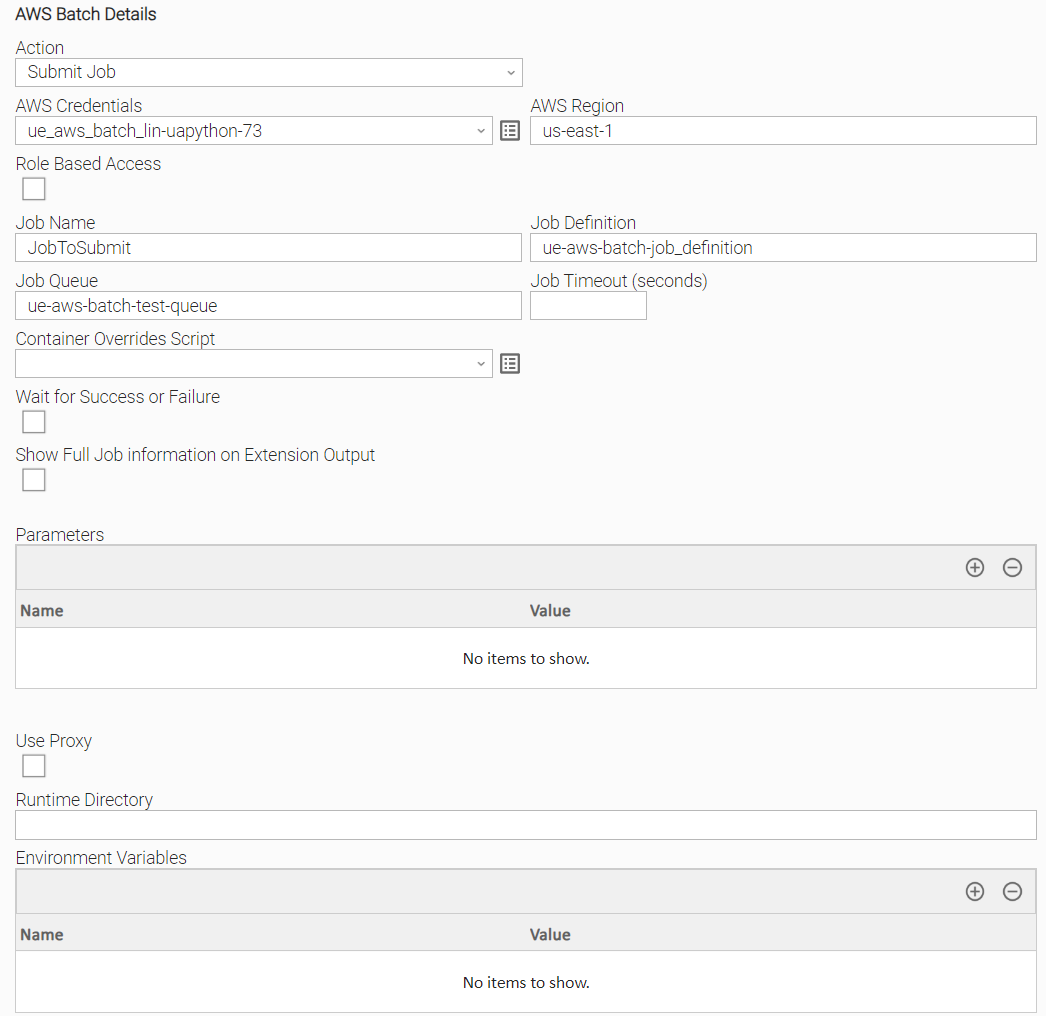
Example: Submit Job, basic configuration
Example of AWS Batch Universal Task for submitting a new AWS Batch Job.
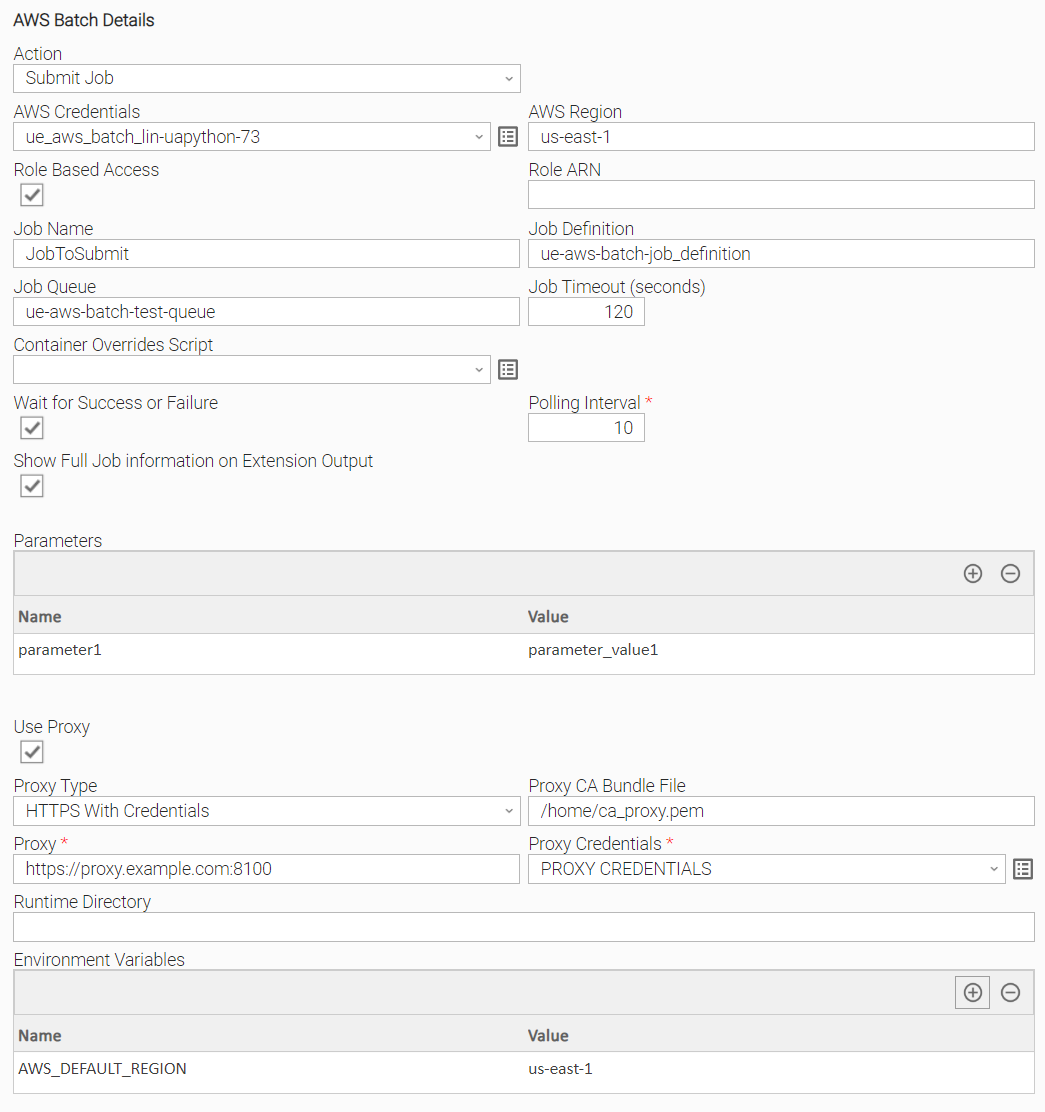
Example: Submit Job, environment variable credentials, wait for completion, HTTPS proxy with credentials
Example of AWS Batch Universal Task for submitting a new AWS Batch Job with AWS Region provided as an Environment Variable and AWS Credentials left empty in the task definition, so credentials are resolved from the task execution environment. The task also sets Job Timeout, Container Overrides Script, Wait for Success or Failure, and Proxy Type "HTTPS With Credentials".
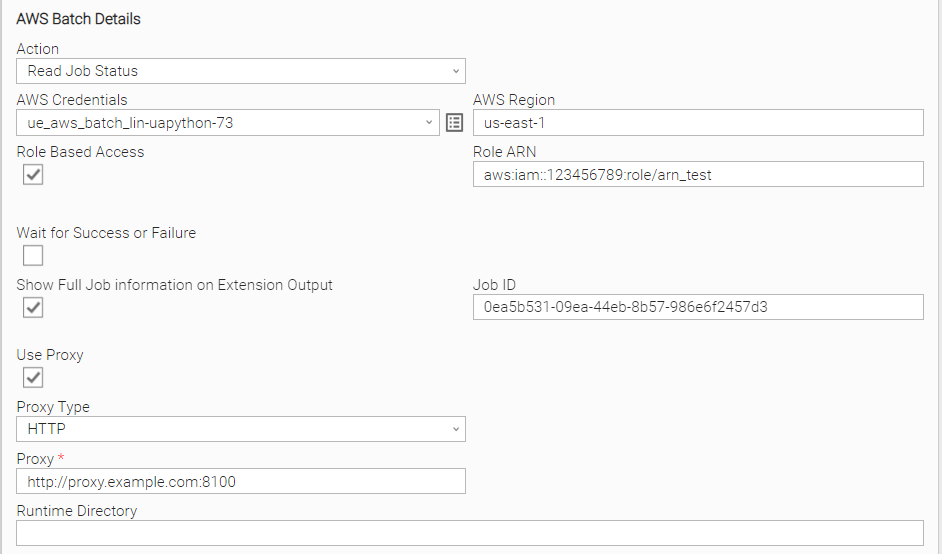
Example: Read Job Status, Role Based Access, HTTP proxy
Example of AWS Batch Universal Task for reading the status of an existing Batch Job by ID, using Role Based Access and an HTTP proxy connection.
Input Fields
Name | Type | Description | Version Information |
|---|---|---|---|
Action | Choice | The action performed upon the task execution. Available options:
| Introduced in 1.0.0 |
AWS Credentials | Credential | AWS access key ID and AWS secret access key, provided as AWS Access Key ID as Runtime User and AWS Secret Access Key as Runtime Password. When not populated, credentials are resolved from the task execution environment. Refer to boto3 credentials configuration for more information. | Introduced in 1.0.0 Modified in 1.1.0 |
AWS Region | Text | Region for the Amazon Web Service, for example When not populated, region is resolved from the task execution environment. Refer to boto3 configuration options for more information. | Introduced in 1.0.0 Modified in 1.1.0 |
Role Based Access | Checkbox | Check to authenticate using IAM Role-Based Access Control (RBAC), where temporary, limited-time credentials are assumed for the specified role instead of static AWS credentials. Defaults to unchecked. | Introduced in 1.0.0 |
Role ARN | Text | Amazon Resource Name (ARN) of the role to assume, in the format This field is required when Role Based Access is checked. | Introduced in 1.0.0 |
Job Name | Text | The name of the Batch Job to submit. This field is visible when Action is | Introduced in 1.0.0 |
Job Definition | Text | The job definition used for the job, specified as a name, This field is required when Action is | Introduced in 1.0.0 |
Job Queue | Text | The job queue where the job is submitted, specified as a name or Amazon Resource Name (ARN) of the queue. This field is required when Action is | Introduced in 1.0.0 |
Job Timeout (seconds) | Integer | The timeout, after which Batch terminates the job if it has not finished; a job terminated for timeout is not retried. This configuration overrides any timeout configured on the job definition. Minimum value is Optional when Action is | Introduced in 1.0.0 |
Container Overrides Script | Script | The container overrides to apply to the submitted job, provided as a JSON payload. This field is visible when Action is | Introduced in 1.1.0 |
Wait for Success or Failure | Checkbox | Check to keep the task running until the submitted job reaches the This field is visible when Action is | Introduced in 1.2.0 |
Polling Interval | Integer | The interval, in seconds, between checks of the Job Status while waiting for completion. Defaults to This field is required when Wait for Success or Failure is checked. | Introduced in 1.2.0 |
Show Full Job information on Extension Output | Checkbox | Check to include the latest full job information returned by AWS Batch in the Extension Output. Defaults to unchecked. | Introduced in 1.3.0 |
Parameters | Array | Parameters passed to the job that override the parameter substitution placeholders set in the job definition, specified as key/value pairs. Optional when Action is | Introduced in 1.0.0 |
Job ID | Text | The Job ID of an already submitted Batch Job. This field is required when Action is | Introduced in 1.0.0 |
Use Proxy | Checkbox | Check to route communication with AWS through a proxy. Defaults to unchecked. | Introduced in 1.0.0 |
Proxy Type | Choice | Type of proxy connection to use. Available options:
| Introduced in 1.0.0 Modified in 2.0.0 |
Proxy CA Bundle File | Text | The path to a custom certificate bundle used when establishing SSL/TLS connections with the proxy. This field is visible when Use Proxy is checked. | Introduced in 1.0.0 Modified in 2.0.0 |
Proxy | Text | Proxy server and port, for example This field is required when Use Proxy is checked. | Introduced in 1.0.0 |
Proxy Credentials | Credential | Credentials used for the proxy connection. This field is required when Use Proxy is checked. | Introduced in 1.0.0 Modified in 2.0.0 |
Output Fields
The following output-only fields provide better visibility during the execution of Universal Task Instances.
Name | Type | Description | Version Information |
|---|---|---|---|
Job ARN | Text | Amazon Resource Name (ARN) of the submitted Batch Job. Generated by the Submit Job action. | Introduced in 1.0.0 |
Job Name | Text | Name of the Batch Job. Generated by the Read Job Status action, and by Submit Job when Wait for Success or Failure is checked, updating live during execution. | Introduced in 1.0.0 Modified in 1.2.0 |
Job ID | Text | ID of the submitted Batch Job. Generated by the Submit Job action. | Introduced in 1.0.0 |
Job Status | Text | Status of the Batch Job. Generated by the Read Job Status action, and by Submit Job when Wait for Success or Failure is checked, updating live during execution. | Introduced in 1.0.0 Modified in 1.2.0 |
Cancellation and Rerun
- In case of cancellation, there is no extension-specific cancellation logic; the submitted AWS Batch job continues running independently of the Universal Task Instance.
- In case of rerun, a new Batch Job is submitted; the previous job is not affected.
Exit Codes
Exit Code | Status | Description |
|---|---|---|
0 | Success | Successful Execution. |
1 | Failure | Generic error. Also returned when Action is |
2 | Failure | Authentication error. The provided credentials are invalid or insufficient. |
3 | Failure | Authorization error. The account is not authorized to perform the requested action. |
10 | Failure | Connection error. The connection data is invalid or the connection timed out. |
11 | Failure | Connection error connecting to the configured proxy. |
20 | Failure | Input fields validation error. |
22 | Success | The Job Status is Valid only for Action |
23 | Success | The Job Status is Valid only for Action |
24 | Success | The Job Status is Valid only for Action |
25 | Success | The Job Status is Valid only for Action |
26 | Success | The Job Status is Valid only for Action |
27 | Success | The Job Status is Valid only for Action |
Document References
Document Link | Description |
|---|---|
User documentation for creating, working with and understanding Universal Templates and Integrations. | |
User documentation for creating Universal Tasks in the Universal Controller user interface. | |
User guide for AWS Batch. | |
User Documentation for Comparing ABAC to the traditional RBAC model. | |
Reference for the AWS Batch API operations and parameters used by this integration, such as job submission and job description. | |
User documentation for creating and configuring the IAM role assumed when Role Based Access is used. |
Changelog
ue-aws-batch-2.0.0 (2026-08-04)
Enhancements
Added: Update boto3 library to increase compatibility.Changed: Improved Python compatibility with future Agent versions.Changed: Proxy Type is now available regardless of Use Proxy, rather than only when Use Proxy is checked.Changed: Proxy CA Bundle File and Proxy Credentials are now shown as soon as Use Proxy is checked, rather than only when a specific Proxy Type is selected.
Deprecations and Breaking Changes
Breaking Change: Dropped support for Agents with version <= 7.6 and for Python 3.7.
ue-aws-batch-1.3.1 (2024-02-01)
Fixes
Fixed:Revertcertifias requirement. (#35294)
ue-aws-batch-1.3.0 (2023-12-11)
Enhancements
Added: Extension Output is enhanced to provide the latest job information coming from the AWS Batch Service. (#33753)
ue-aws-batch-1.2.1 (2023-08-04)
Fixes
Fixed:Field 'Proxy Type' raised a data validation error on Controller 7.3.0.0 and later. (#34038)
ue-aws-batch-1.2.0 (2022-07-19)
Enhancements
Added: Support Submit Batch Job and Wait until Job Reaches status "Succeeded" or "Failed (#29278)Added: Output fields are updated during execution for the above scenario.Added: Log payload response for Read and Submit Job Action on debug mode.
ue-aws-batch-1.1.0 (2022-06-09)
Enhancements
Added: Provide the capabilty to rely on AWS credentials set-up on the environment where the extension is running and therefore it is not mandatory to be passed on the task definition as input fields. The same applies to AWS Region. (#28286)Added: AWS Region can be resolved from environment variables. (#28286)Added: Support for "containerOverrides" parameter. (#28860)
ue-aws-batch-1.0.1 (2022-03-14)
Enhancements
Added: Update of extension icon. (#27753)
Fixes
FixedFix wrong exit code when invalid ARN is provided. (#27736)FixedFix response message when status is SUCCESS. (#27730)